Building and running a successful website takes the same amount of skill and hard work today as it did 20 years ago. The same can be said for marketing methods and channels.
The evolution of marketing by email has increased, along with the technology surrounding the medium. Make certain your website supports a Responsive design. This concept makes web pages render well on a variety of screen sizes without writing different code.
If you are asking yourself how to start an email newsletter? Begin with a responsive website, and every email you send will look comfortable on smartphones, tablets, and desktops.
Email remains the most effective and least expensive sales channel available to small businesses. Not much has changed in the fundamentals of email marketing.
- Useful lists built from referrals that are continually cleaned
- A killer Subject Line
- Great content to keep them reading
If you want to increase or answer the question, how do I start a newsletter? This post gives you a solid footing. We will cover some best practices and advice gleaned from the massive amount of material available on the internet.
- How to start a newsletter
- Strategies to collect more addresses
- Newsletter design, Mobile First
- Subject Line
- Visual Power Structure
- Color
- Strong Calls to Action
How do you start an email newsletter?
You start an email newsletter by choosing an email platform, adding a signup form to your website, and planning a simple, mobile-first template you can reuse. The same principles behind writing good email marketing content apply to every issue.
There are dozens of quality companies in the marketplace that can get you up and running in a few clicks, along with a meager monthly fee attached. This issue this author has with this simplistic approach; you are not learning what it takes to be successful.
Successful newsletters require good quality lists or people who are interested in your message. A subject line is more than a collection of dis-associated words; it is the introduction that pulls readers into your story. Selecting a template from the dozens available does not express the interests or needs of your readers.
Marketing 101 says; it costs five times more to gain one customer than to keep an existing one. The moral is, how do I start a newsletter? Use effective strategies to build a quality email list and never let them leave.
Sustainable growth for your website comes from focusing on customer retention, and the best way to start a newsletter. It is not easy to build the kind of list that contributes to sales growth. However, once you have decided to start an email list and eventually a newsletter, Never Give Up!
FACTS: 102.6 trillion emails are sent and received each year, and that number is rising. What’s more, 49% of all emails are opened on mobile devices. (wpforms)
How do you get more newsletter subscribers?
You get more subscribers by giving website visitors a clear reason to join, such as a discount or a useful guide, and by asking at the moments they are most engaged, like checkout. For more ways to grow sales from your list, see how to increase sales through email marketing.
- Pop-ups and slide-ins have become much more sophisticated than the annoying advertisements of the past. Most long-term surfers remember the days of simply giving up on a website because the ads were so intrusive.
Use timed pop-ups and onsite retargeting to get the most out of your customers. When a customer spends a specific amount of time on your site, a pop-up appears with a CTA. Other examples of timed pop-ups; when a user leaves a site or scrolls a certain percentage down the page. For instance:
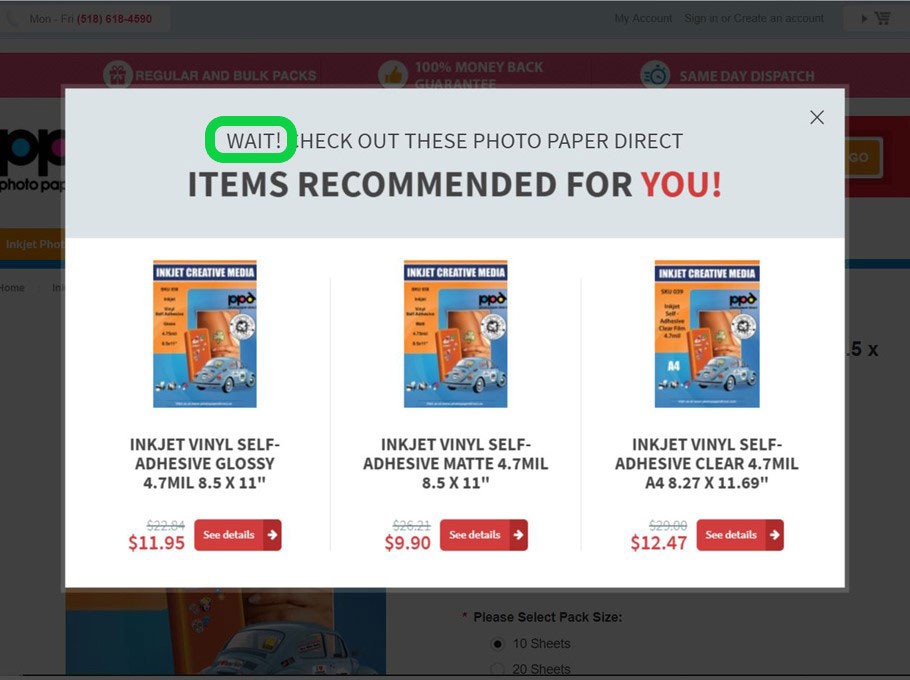
(Image Credit: OptiMonk)
If done right, pop-ups are an effective way to collect email addresses and how to run a newsletter effectively without gimmicks. Digital Marketer collected 2,689 leads in 14 days using the right kind of advertising.
- Pitch email newsletters on your social media accounts. If you have Twitter followers or a fanbase on Facebook, use those contacts to start an effective email list.
People who follow you are already fans; however, they may not be aware of your newsletter. Pitch them your ideas or services. Use any of your signatures as a link to upcoming newsletters.
Ensure you communicate daily on sites like Twitter and Facebook, once a month is not going to cut it.
- Create more landing pages linking back to your website and newsletter. Several surveys conducted by HubSpot found a 55% increase in followings from an increase of pages from 10 to 15.
Individualized pages strategically placed around the web allow any small business to look like a giant and appeal to a larger demographic. Every person who visits your site has different wants and needs. The more landing pages you create, the more comprehensive your answer.
- A/B testing is critical for success. A lot of single-site webmasters consider A/B testing is only for larger, more sophisticated sites. Nothing could be further from the truth. This type of testing is critical for younger sites. Here is an example of what that can look like:
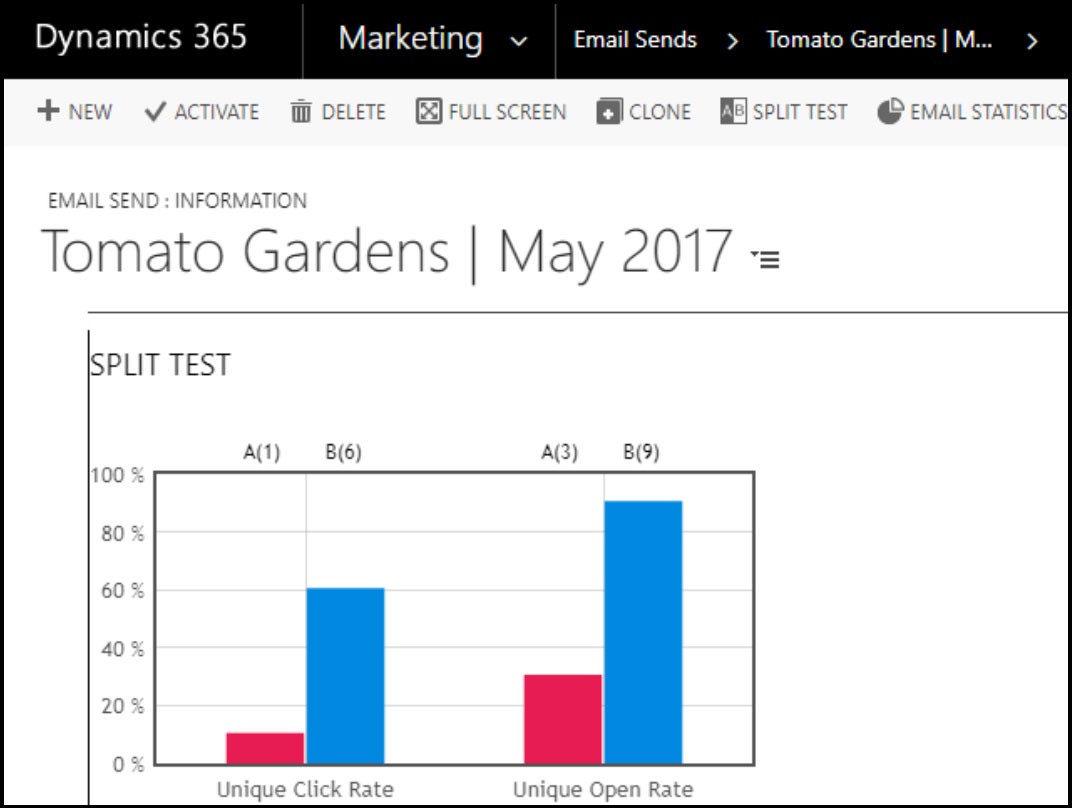
(Image Credit: ClickDimensions Support)
Knowing when your customer is ready to purchase, what color, size, or shape is invaluable information.
Asking for an email address is always the best way to start a newsletter!
Newsletter Design, Mobile First:
Thousands of newsletter templates exist on the internet for the taking. These templates need to be changed, copy and paste, color rendered correctly, and content other than lorem ipsum. No template exists that truly represents your website without significant changes.
Starting a newsletter design template should be mobile-first rather than a desktop design reconfigured to fit a smaller screen. Unlike a desktop, mobile screens and technology do not support flamboyant and intricate text or complex designs.
There are billions of email inboxes configured in different ways. There are numerous devices, screen sizes, and mail platforms to complicate the matter. If you plan on using an opt-in email platform, make certain it offers different inbox types to test your designs.
If nothing else, make sure any email management tool you choose has a render option for varied inbox types. Test your design with as many options as you have available. You want to make sure your newsletter looks as intended across a wide range of inboxes. The image below shows a tool that tests your emails to make sure they are compatible with different devices:
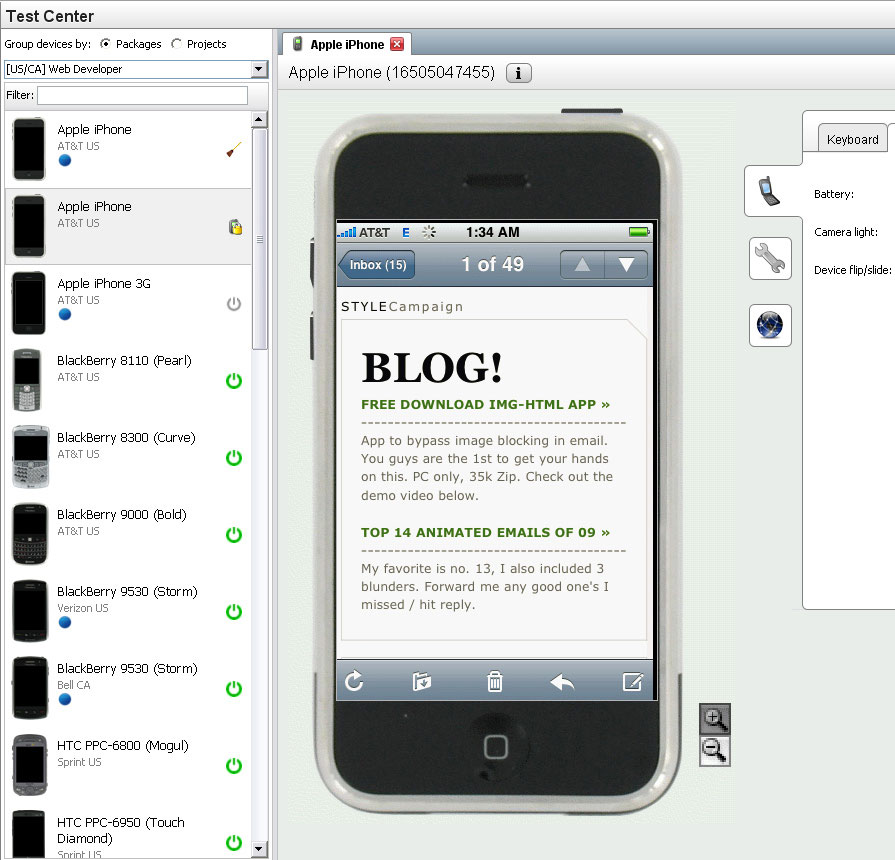
(Image Credit: The eMail Guide)
No matter the tools you use, it is vital to pay attention to each aspect of your message; online tools can help but are far from perfect.
How Important is the Subject Line?
This short phrase determines your newsletter’s success or failure, so do not pass over the importance. Entire books and a significant number of articles have been written on what constitutes a compelling subject line.
Experts agree on this one facet of an email; no more than 41 characters or 7 words are needed as your subject line’s sweet spot. Think about that for just a minute; seven words to determine success or failure. “No Pressure!”
Consider these tips for your subject line:
- Shorter is better; one of the many studies on the subject found 4 to 15 characters received the highest open rates. Lines over 50 characters had the worst open rates. Designing for mobile means your subject line should be aggressive and short.
- Digital marketing in today’s world is all about hyper-targeting. Personalized content across various channels is what customers expect. If they do not get what they want, expect them to leave, and never come back.
- The clarity in a subject line is paramount. Vague and nondescript subject lines have the worst open rates of all studies performed. If you are sending emails regularly, keep each subject line fresh and on-point, this is the best way to start a newsletter.
- Hold a bit back in the subject line and spark your reader’s interest. You are looking for a line that is descriptive but is also clickable.
- Plenty of webmasters want to put a CTA in their subject line; if you can fit one in, go ahead and add it. However, including a CTA just to have one is not a good idea. You want your clients to open the email first, and if they do, and a clear, specific CTA gives them one obvious next step.
- Try a time-sensitive subject line for better results. Urgency is the key and results in 22% higher open rates. Starting a newsletter tomorrow or starting a newsletter tomorrow means people need to see what is inside.
What NOT to do with a subject line:
- Do not rely on the trusty old spell checker. Misspelled words are a quick way to get your newsletter at the bottom of a deleted folder; Check and recheck!
- Annoying punctuation is a way to drive people crazy. Too many exclamation points or periods might look acceptable to you, but they are irritating to everybody else
- Using ONE emoji helps your email stand out; any more than that, and it is excessive
- Avoid using trigger words, like Free, Million, or Boss. Some words just sound promotional.
Considering each character of your Subject Line is critical to your success. Write and rewrite until it is perfect. Ask your family and friends for advice; ask a long-lost cousin if necessary. Pay attention to singular and plural; even spaces can make a huge difference in meaning.
Too many characters and your subject line will be truncated, and all that hard work is lost. Most marketing experts call this dilemma the “goldilocks conundrum.” What character limit is just right for your newsletter?
Remember, you are targeting mobile clients. What does your subject line look like when your customer opens their email client?
- Outlook displays 78 characters in a browser at full width on a 15″ laptop
- Gmail displays 36-38 characters on an iPhone
- Yahoo mail features 38 to 42 on the iPhone before the rest is truncated
FACTS: Personalized subject lines are 22% more likely to be opened. Another interesting fact being subject lines with a sense of urgency and exclusivity get a 22% higher open rate. (wpforms)
How should a newsletter be laid out?
Put the most important content at the top, use one readable font, break text into short sections, choose simple colors, and keep images light so the email loads fast on a phone.
No matter how loyal your customers are, it is rare for any client to read to the end of a newsletter. At best, they will read the first few sentences of paragraphs then peruse the rest. Using this known fact, place your most essential parts of the newsletter at the top or near the top.
Remember, mobile newsletters do not offer webmasters a lot of fancy fonts to play with. This should never slow down a creative marketer. Make your reader’s life easier by keeping fonts and size consistent and easily readable throughout.
Fonts
Always use web-safe fonts. Cursive, thick fonts may look fun and enticing on a 22″ monitor during the daylight. What do they look like at the end of the day with tired eyes and dim lighting? Editors, especially Microsoft’s Word, have a couple of hundred different fonts, do not go crazy and try out each one on your customers.
The following are considered web-safe fonts:
- Arial
- Comic Sans MS
- Courier New
- Georgia
- Lucida Sans Unicode
- Tahoma
- Times New Roman
- Trebuchet MS
- Verdana
It is advisable to choose a single font and size for your website and stick with that script to communicate to the outside world. Customers crave consistency, and it strengthens your brand. The image below shows a good example of font on the left and a bad example on the right:
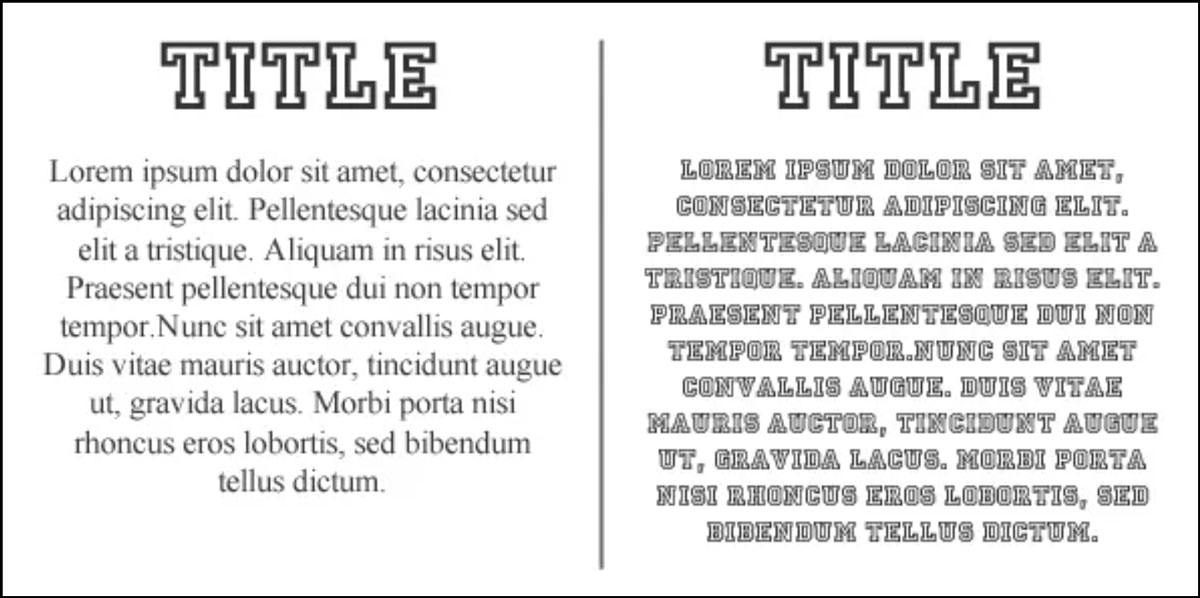
(Image Credit: Ray Rico Freelance)
Breakup Text
How many of us read a single piece of text through to the end? If you have long paragraphs of the same fonts and size, chances are your newsletter will not be read. People tend to skim through their emails, looking for something interesting.
Break up the first part of your newsletter, use short sentences and paragraphs. Maybe a quick loading image or a few bullet points can be a tremendous advantage to getting your newsletter read.
Best Practices
- Use a bigger font size for the points you feel are most important and a smaller size for the less important
- Highlight important features of your newsletter by changing position, size, and contrast
- Include your logo at the top of every piece of communication your website puts out. This immediately tells your customer who the email is from
- Use reduced file size images and bullet points to break up the text
Color
How many times have you surfed a website or received an email with colors so bland you were asleep before the first paragraph? Or maybe a white background and yellow lettering. This is a good example of why you need to test and then retest, making certain these mishaps do not sabotage your message.
Shades of grey and white are excellent choices for a mobile background. These colors help your newsletter load much faster on a mobile device. Backgrounds that are bright and direct compete with text. Your goal is a clean and simple presentation.
Choose a background that complements the overall design. If you have a website, try working your site colors into the email, if they do not compete too much. If you want to match colors exactly, use ColorCop for a PC and Digital Color Meter for Macs. Here is an example of how that works:
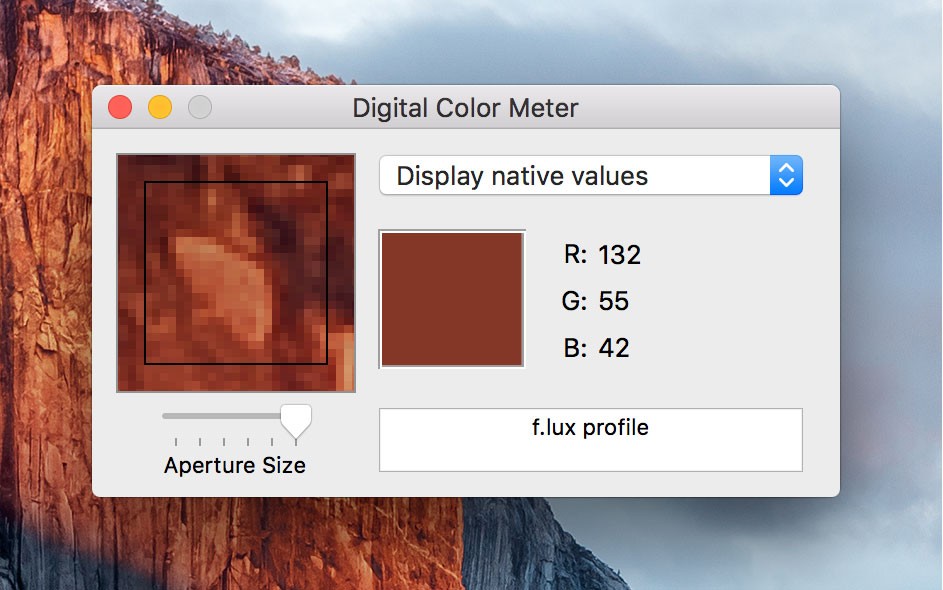
(Image Credit: iDownloadBlog)
Test and retest.
Use Photos with Caution
If you have photos for your newsletter, by all means, use them. No content engages your audience better than videos or photos. However, photos take work before placing them in a newsletter. Images do not load quickly; having too many makes your newsletter less effective and dilutes the message.
- There are hundreds of online services that will reduce the size of your image. Upload the image, run through the service, and download to your template.
- Keep your images under 500px, which will help your newsletter load much faster
- Start your email with compelling text and place photos or videos lower in the template. This photo placement gives them time to lazy load.
If you plan on using a lot of images for your newsletter, email filters consider these types as spam. Look to incorporate lazy load images and use photos sparingly. This design concept defers the initialization of an image until it is needed. If appropriately used, Lazy Load images can increase the efficiency of your newsletter.
Alt-Text
Customers may have images turned off for their email clients because the message loads much quicker. Others are visually impaired and rely on screen readers embedded in their email client. This is an excellent opportunity to use Alt-text.
A large number of webmasters skip over the use of this valuable tool as unimportant, assuming no-one uses it. Alt-text is the alternative text displayed with an image, describing additional attributes on what the guest is looking at.
Alt-text gives webmasters extra space to describe their product or additional actions needed to complete an action, and so on. Appropriately used, alt-text is very powerful. Right-click on any image in your newsletter, head to properties, then fill out the alt-text field.
Email clients have size limits on send and receive emails. If your newsletter approaches this limit, more than likely, it will never be opened. Internet speeds are not the greatest, and email messages with plain text speeds are worse. Photos slow down any email message even more.
Strong Calls To Action
When you want your reader to buy something or take some type of action; a strong, well-placed CTA is the answer. Just like the subject line, volumes have been written on writing an effective call to action and what motivates people to push a button or make a call.
On a mobile device, It is important to distinguish a clickable CTA from a hyperlink. Small screen makes choosing sometimes haphazard and accidents do happen. Plenty of tools are available to make certain mistakes do not happen.
Make a CTA stand out in your newsletter by giving it a distinctive color from the rest of the content. Test to see if placement of a CTA button is best used at the beginning of your newsletter or at the end. This distinction depends on the type of action you need your customer to take. Best practice advice says, keep the CTA near the top of your content. This is an example of a call to action:
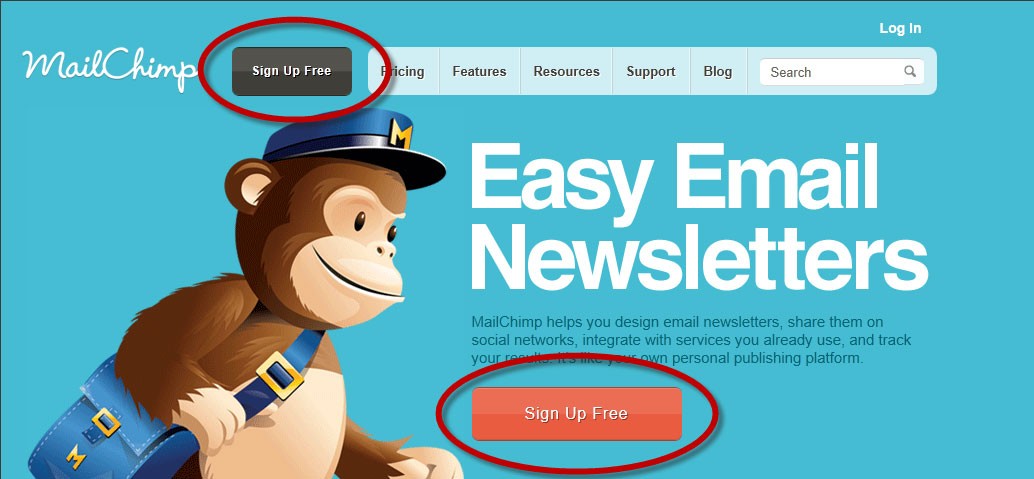
(Image Credit: Writtent)
Starting a newsletter boils down to having a good solid call to action for your customers.
How can diib help your newsletter?
diib connects to your Google Analytics account, so you can see how much traffic your newsletter sends to your website and which pages those readers visit. Run a free diib scan or see diib’s plans.
How to run a newsletter encompasses all the hard work, testing, and retesting. This one vital aspect of your content. Moving your customer to act on your offer. Teaming up with Diib Digital can give you the metrics necessary to make strategic decisions and know the direction you should move in. Here are some of the features of our User Dashboard we’re sure you’ll appreciate:
- Keyword, backlink, and indexing monitoring and tracking tools
- Google Core Algorithm monitoring
- Newsletter campaign monitoring and demographic tracking
- Alerts to broken pages where you have backlinks (404 checker)
- Alerts and Objective that guide you to strengthen your website
- Monthly call with a growth expert
Click here for your free 60 second site analysis and industry ranking or call 800-303-3510 to speak with one of our Growth Experts.
Frequently asked questions
What is the best free email newsletter service?
Many email platforms offer a free plan for small lists, including Mailchimp, MailerLite, Brevo, and Kit. Compare the subscriber limit, monthly send limit, and whether the free plan removes the platform's branding. Pick the one whose free tier fits your list size for the next year.
How do I get a free mailing list?
Build it yourself from people who asked to hear from you. Add a signup form to your website, offer a clear reason to join such as a discount or a useful guide, and collect emails at checkout or events. Never buy a list, because it hurts deliverability and breaks consent rules.
What should be included in a company newsletter?
Include one main story or update, a helpful tip or piece of news your readers care about, a featured product or offer, and one clear call to action. Add your logo at the top and an easy unsubscribe link at the bottom so readers always know who the email is from.
What are 5 elements of an effective newsletter?
An effective newsletter has a short subject line that gets it opened, a clear opening that says why it matters, content broken into short sections, images that load quickly on a phone, and one strong call to action. Test each issue on mobile before you send it.
How long is a newsletter typically?
Most readers skim, so shorter usually works better. Put the most important item near the top, keep each section to a few sentences, and link to your website for the full story. A newsletter someone can read in two or three minutes respects their time.
How long should a newsletter subject line be?
Short enough to fit on a phone. Gmail on an iPhone shows only about 36 to 38 characters, so put the key words first. Specific, personal, and timely subject lines usually get more opens than vague or generic ones.