Optimizing a website for increased traffic can sometimes take a lot. Optimizing can require investment in several different tools. Everyone wants his/her website to rank favorably on search engine result pages. One way to optimize your content for search engine ranking is using links. Backlinks help generate traffic, increasing your web presence. However, not all links count towards your rankings. Some links contribute to increased traffic but not to your ranking. A no follow link specifically allows visitors to access the linked pages on your website without contributing to the ranking parameters for such links. Thus, you can provide links to other content without contributing to their ranking.
Many websites allow people to contribute content without letting them earn ratings for following links. The websites make use of no follow link code to manage the links on the website. The code allows viewers to follow such links without influencing the ranking of such content. Thus, you can use no follow link html code to allow others to contribute content on your website without letting them build their SEO ranking using those links.
FACT: Google’s own spam policies say paid links are fine as long as they are marked with rel=”nofollow” or rel=”sponsored”. Paid links without those tags count as link spam. (Google Search Central)
What is a nofollow link?
A nofollow link is a link with rel=”nofollow” in its HTML code, which asks Google not to pass ranking credit to the page it points to.
Nofollow links are links to your website that have the rel= “nofollow” tag. Google’s guide to qualifying outbound links says links marked with nofollow will generally not be followed. As such, a nofollow link does not directly help your search ranking. However, viewers can still follow such links back to your website. Since a no follow link does not count towards a website’s ranking, most people assume that such links have little to no benefit to a website. However, nofollow links can help you optimize your site in several ways. Here is an example of this type of link:
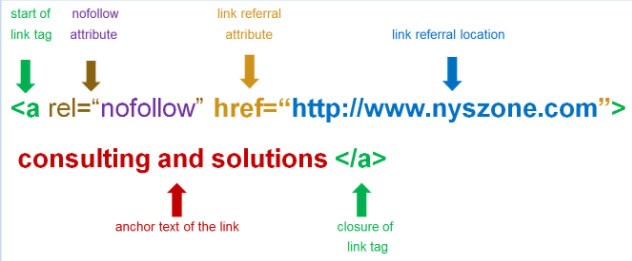
(Image credit: Ezibeline)
Why do nofollow links matter if they don’t pass ranking credit?
Nofollow links still send real visitors to your site, and those visitors can become customers, share your content, or link to you later with a normal link.
Most people misunderstand nofollow links and therefore do not know their value. However, despite not counting directly towards your website’s search engine ranking, they add value to the website and help boost traffic. Followed backlinks can help your SEO rankings. Nofollow links don’t pass that ranking credit, but people can still click them and land on your website. Their impact is therefore indirect. Rather, they lead visitors back to your website where the visitor can then interact with content on different pages. Those visitors may go on to buy, share your content, or link to you. Nofollow links do not raise your Domain Authority, which is a score from the SEO company Moz, not from Google. Here is a visual that will help you understand:
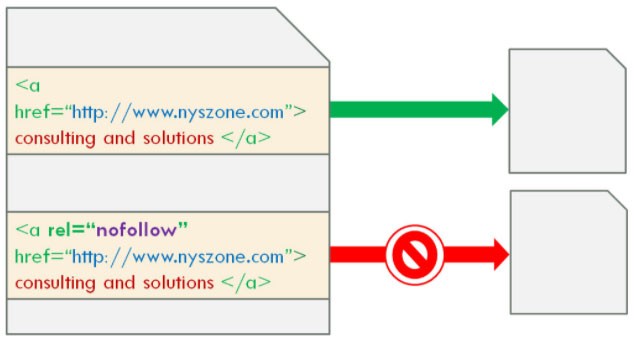
(Image credit: Ezibeline)
The use of no follow link codes started because people and companies developed a habit of putting their website URLs as comments on blogs. Those comment links boosted the posters’ rankings while giving the blog owner little benefit. Spam companies maximized on this and overloaded blogs and other websites with links that made their websites rank better than the credible sites with valuable information. The introduction of nofollow links by Google then allowed companies to create no follow link html code to prevent spam sites from posting their URLs on the comment section to boost their search rankings. With that, content creators can now post content on their sites without worrying that other companies and people are going to misuse the comment section to boost their rankings at the expense of the valuable sites. The use of a no follow link href code ensures that while people can post URLs on your website, those links they provide would not count towards their sites’ rankings.
When should you use nofollow links?
Use nofollow, or Google’s more specific rel=”sponsored” and rel=”ugc” values, on paid links, blog comments, forum posts, and any link you don’t want to vouch for.
Instances that necessitate the use of nofollow links include blog comments, forums, and paid links. Google designed nofollow links specifically for blog comments. Prior to that, spam companies were taking advantage of valuable content online to build their websites’ rankings. Today, WordPress adds nofollow to links in comments by default, which takes away the ranking value spammers want from comment links. While visitors to the page can still see and click on the links, the no follow link href code limits the benefits of such links.
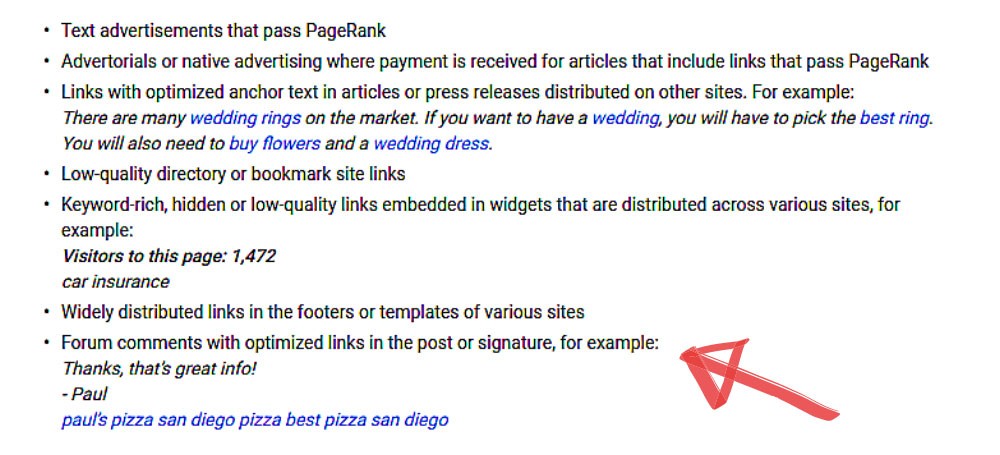
Similar to comments, people can take advantage of forums to post links redirecting back to their websites. Spam companies can take advantage of forums to boost their search engine rankings by constantly posting their links on forums. Nofollow links discourage spam companies that seek to boost their rankings by posting links on other websites. We have all had to see, or even deal with, spam like the following:
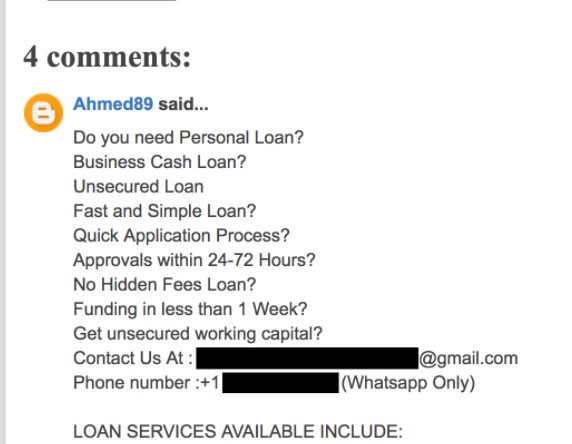
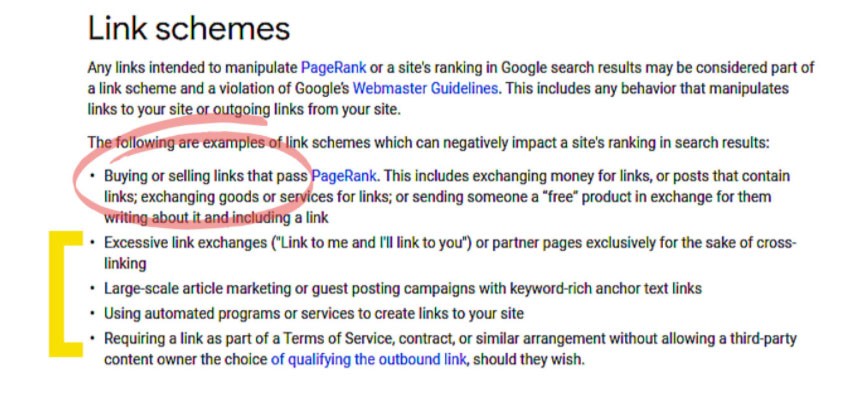
Sometimes companies pay for links. There are websites that allow paid links to help companies drive traffic to their websites. Google’s spam policies treat buying or selling links that pass ranking credit as link spam. Marking paid links with rel=”nofollow” or rel=”sponsored” keeps them within Google’s rules. Here is Google’s link scheme policy:
The nofollow links prevent other companies from overloading your content with unnecessary links. They help you maintain your site’s authenticity while keeping the web pages interactive. Thus, you are able to create and build relationships with your audience. Your content remains valuable to visitors as there may be fewer links to contend with.
How do nofollow links differ from dofollow links?
A dofollow link is a normal link with no rel=”nofollow” value, so it can pass ranking credit, while a nofollow link asks Google not to pass that credit.
Ordinarily, dofollow and nofollow links look the same visually. However, their coding differs, making them have a different effect on a website. The no follow link code uses the html rel=”nofollow” tag to inform search engines that a link should not count towards the ranking of a website. Thus, any link with the tag does not have a direct impact on SEO. Since dofollow links do not have the rel=”nofollow” tag, they count towards your site’s ranking. Dofollow links can help your Google ranking, and they also count toward Moz’s Domain Authority score. While both do follow and nofollow links may lead to an increase in traffic to your website, dofollow links are preferable because they have greater value in rankings. However, nofollow links also have several benefits to your website, albeit indirectly. You can therefore use them to your advantage.
What are the benefits of nofollow links?
Nofollow links can bring visitors, build brand awareness, keep your link profile natural, and lead to followed links later, but they do not raise your Domain Authority.
Although nofollow links do not have a direct impact on your search engine results rankings, they have indirect benefits. Some of the benefits include increasing traffic to your website, normalizing your profile, building brand awareness, and leading to dofollow links.
Increasing Website Traffic
Nofollow links may not help in building your backlink profile. However, they still lead to increased traffic to your website. People can still click the links and follow them back to your website. Thus, if you provide valuable and relevant content, people will constantly be following your nofollow links back to your pages. As more traffic flows to your website, people will be able to interact with more of your content. Visitors who land on your site can then follow your internal links to other pages. The content people interact with on your website may also lead to more leads and conversions. Thus, while the nofollow links may not have a direct impact on your ranking, they result in higher traffic, which can have better outcomes. You can therefore use them to attract audiences to your content and build your profile out of the many visits you get. However, you should maintain relevance so that visitors can spend more time on your pages. Here is an example of an increase in traffic after a nofollow link implementation:
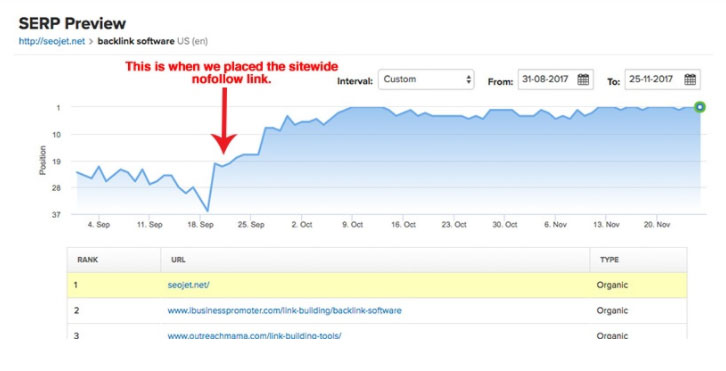
(Image credit: Neil Patel)
Building Brand Awareness
Content creation for SEO aims at creating, building and maintaining a strong online presence. It focuses on creating a brand awareness that can translate into buys from visitors. Nofollow links help in this by directing traffic to your website. As visitors interact with content on your website, they are able to understand your business, products, or services. Through the links, people are able to discover what you offer, and that can be of great benefit to your business. As more people become aware of your brand, visits to your other pages can grow too. And the fact remains, that:
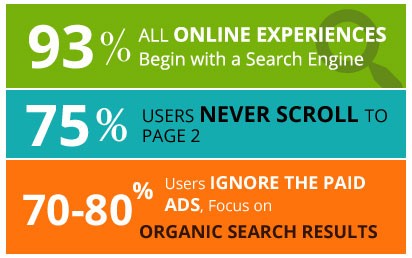
Greater brand awareness leads to repeat visits, as people aware of your business will keep visiting to seek what you offer. Thus, you can use nofollow links to drive traffic to your website and use your content to keep them engaged. The content and products you offer will however play a big role in keeping visitors on your website. The more relevant and engaging your content is, the more time people spend on your site.
Normalizing Your Profile
Your business needs a natural link profile, with both dofollow links and nofollow links pointing to your website. A profile that only has dofollow links can look unnatural, since sites that earn links on their own usually get a mix of both. Having some nofollow links pointing to your website is a normal part of that mix. The nofollow links make your profile look normal, allowing for a better reputation.
Nofollow Links May Lead to Dofollow Links
The biggest advantage of using nofollow links is the resulting dofollow links. Many people may be of the opinion that nofollow links have little value to your website. However, the impact can be huge. Authority websites may only give your site nofollow links. Those nofollow links can still drive traffic to your site. People will develop an interest in your business through these links and will come to interact with your website. The traffic resulting from nofollow links can be crucial in building credible leads. From the leads, you may earn dofollow links.
Although you can achieve dofollow links from nofollow links, you have to structure your website and content in a way that will lead to better SEO outcomes. The impression visitors get when interacting with your content will determine their response. Thus, it is important to optimize your content so that you can retain and convert your visitors. Relevancy and consistency are key to generating and retaining great leads that can help build your dofollow links. The more valuable content you provide, the more leads will provide dofollow links to your website. You can build a strong following by having valuable content that is both relevant and consistent. Valuable, consistent content also helps establish you as an authority in your field.
Why Nofollow Links Don’t Raise Domain Authority
Domain Authority (DA) is a score made by the SEO company Moz to estimate how well a site might rank. Google does not use DA to rank pages. Moz builds the score mainly from followed links from other websites, so nofollow links do not raise your DA, and visitor traffic does not raise it either. What nofollow links can do is bring in visitors who later link to you with a normal followed link. Those followed links are what can help both your Google ranking and your DA.
What is Domain Authority? Domain Authority is a score created by Moz that estimates how likely a website is to rank, based mostly on the links pointing to it. Domain Authority is not a Google metric, and Google does not use it to rank pages.
How do you add a nofollow link?
Add rel=”nofollow” inside the link’s <a> tag, for example <a href=”https://example.com” rel=”nofollow”>, or use a robots meta tag to nofollow every link on a page.
A followed link and a nofollow link look almost the same in HTML. However, while the HTML code is similar for both, you have to add the rel=”nofollow” tag to make a link nofollow. You can use a nofollow link generator or robots meta tag to create nofollow links. It is possible to make all links on a webpage nofollow possible by putting a robots meta tag in the header with the value “nofollow”. However, in case you want to leave some links as dofollow links, then the most common practice is to use the rel=”nofollow” tag. For instance:
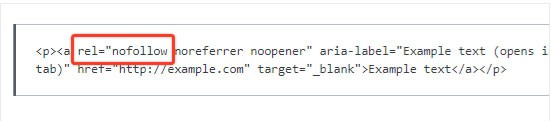
Most people may not know how to add no follow link. However, if you are using WordPress, there are tools that ensure to nofollow links in the comments section of your page. WordPress automatically adds nofollow to links in comments. The nofollow tag prevents spammers from enjoying any SEO benefits from the links they post on your site.
Sometimes, you may be concerned that your links are nofollowed. You can check that by right-clicking on the comment and selecting “Inspect”. The highlighted HTML code will provide the necessary information you need to determine whether it is a nofollow link or not. A nofollow link will contain the rel=”nofollow” tag in the HTML code. You can also install the nofollow Chrome extension on your browser to highlight all nofollow links.
How can you get the most out of nofollow links?
Write link text people want to click, put your links where your audience already spends time, keep them relevant, and send visitors to a strong landing page.
We all seek success in all our efforts. It is thus important to know when to use nofollow links as well as the most effective way to do so. Using nofollow links is only a part of a bigger process of optimizing your website. You can use some effective techniques to ensure your nofollow links are effective at bringing in visitors who stay and come back.
First, you must find a way to motivate viewers to click on the links you post. Getting the click is the first step to start interactions with viewers. Focus on the language that you use. Attractive wording will help capture the attention of the viewers, prompting them to click on the link to your site.
You also need access to a greater audience. A bigger audience means more people see your links, which raises the chance of more people visiting your site. To achieve that, you need to follow industry leaders. You can also share your post multiple times. You may also reference others in your content, increasing the probability that they will share your post.
Relevancy is another key factor in maximizing on nofollow links. Always ensure both your link and content are relevant to increase the impact of the links. People will rarely click on links that contain information that is irrelevant to them. If someone were to click on a link and discover that the information is not relevant, he/she is likely to exit the page without viewing anything else on the site. You should therefore avoid using misleading headlines just to get clicks. Here is a good example of using links in a relevant matter:
Lastly, you need to optimize your landing page. While appropriate wording may earn you clicks from nofollow links, a good landing page increases the chances of subsequent clicks. A well-designed landing page will create a positive impression on visitors, prompting them to visit other pages on the website. A related posts plugin gives visitors an easy next page to read on your site.
How can diib help you track your links?
diib tracks the links pointing to your website and flags the ones that need attention.
Many people write off nofollow links because they don’t pass ranking credit. Nofollow links still bring visitors, and those visitors can turn into customers and followed links. diib’s analytics dashboard tracks the links pointing to your website so you can see which ones are helping. Here are some of the features of our software you’ll love:
- Objectives to help you isolate and remove bad links and fix older backlinks that point to pages that have been deleted from your website.
- Alerts that tell you about your Domain Authority and number of follow/no-follow links pointing to your website.
- Competitor backlink research for up to 10 of your most intense competitors.
- diibLive office hours with diib’s growth experts, where you can ask how to grow your Domain Authority.
Click here for your free 60 second site scan.
FAQ’s
Add rel=”nofollow” inside the link’s <a> tag in your page’s HTML code. That tells search engines not to pass ranking credit to the linked page. To nofollow every link on a page at once, add a robots meta tag with the value “nofollow” to the page’s header instead. WordPress adds nofollow to comment links automatically.
Use nofollow on any link you don’t want to vouch for, such as paid links, blog comments and forum posts. Google also offers more specific values: rel=”sponsored” for paid or ad links and rel=”ugc” for user-generated content such as comments. Google’s spam policies treat paid links without nofollow or sponsored as link spam.
Nofollow links are not useless. They don’t pass ranking credit, but people can still click them and land on your website. Those visitors can become customers, share your content, or link to you later with a normal followed link. Sites that earn links on their own usually get a mix of followed and nofollow links.
Nofollow links pointing to your site are a normal part of a natural link profile and are generally not a problem. Google’s guidance says links marked nofollow will generally not be followed, so they don’t pass ranking credit. Marking paid links with nofollow or sponsored also keeps them within Google’s spam policies.
Domain Authority (DA) is a score from the company Moz that predicts how likely a website is to rank compared with competitors. Moz calculates it mostly from backlink data, such as how many sites link to you and how strong those links are. Moz says DA is not a Google ranking factor, so compare your score with competitors.