What does it mean to disavow a backlink?
Disavowing a backlink means asking Google to ignore a link from another website when it judges your site.
Bad backlinks plague every webmaster. In this article, we are going to teach you how to disavow bad backlinks. The word disavow can have numerous meanings depending on the context. The google dictionary shows that disavow means to reject, disown, deny, or disclaim. To disavow or reject a backlink simply means discarding or disowning malicious links pointing to your site. We are going to cover most of the crucial information that you need to know about disowning backlinks. We are also going to understand how to disavow a link.
What are Backlinks?
A backlink is a link on another website that points to your website.
Backlinks are also called inbound links. Search engines such as Google use backlinks as one signal when they rank websites. Links from other sites tell Google that people trust your content enough to send visitors to it.
Good quality backlinks from credible sites play a significant role in increasing your website ranking position. Having a good ranking position makes it easy for users to find you in the search engines.
Natural vs. unnatural backlinks (links that need to be disavowed)
For a backlink to add value to your website, it must be natural, and from a credible source. Natural backlinks are genuinely created by other websites directing users to get extra information from you. In the natural backlink, you do not interfere in any way. The backlink is done voluntarily and genuinely by the other website. Sometimes, you will find links that you need to disavow.
However, you should note that not every backlink is natural. Some backlinks are unnatural and toxic and can hurt and even lead to the de-indexing of your site. Here is an example:
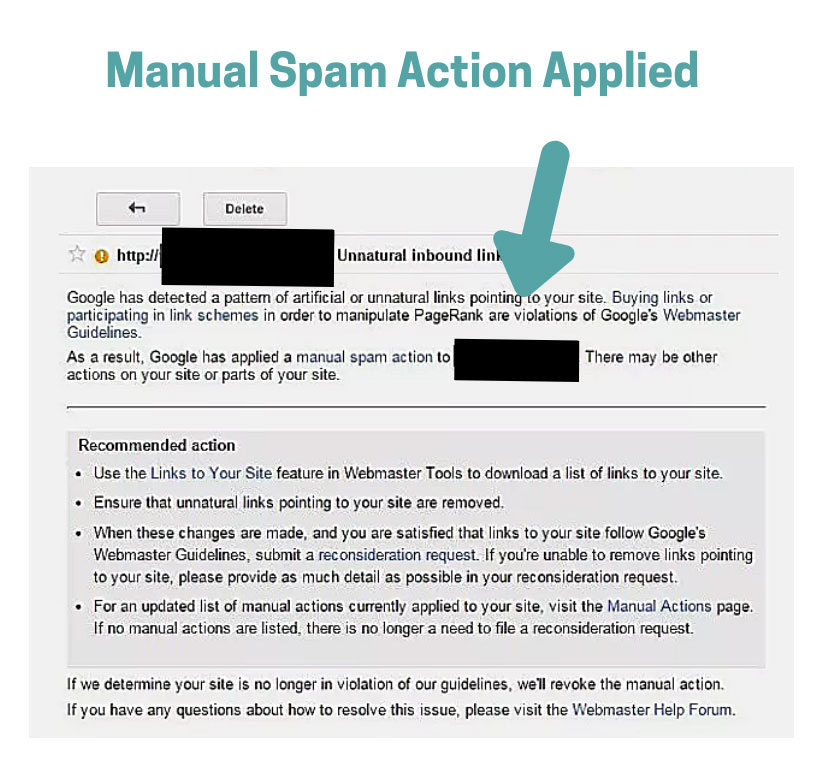
Some spammers manipulate search engines by creating unnecessary backlinks to boost their ranking position or to get paid. Backlinks that you pay or let others spam your site just to get a higher rank is known as unnatural backlinks. When you use unnatural backlinks, you deny web users from getting valuable information from genuine websites.
Google’s spam policies list buying or selling links, excessive link swaps, and spammy forum, footer and directory links as link spam, and Google says sites that break these policies “may rank lower in results or not appear in results at all.” Some of these toxic website owners might lead you into trouble if they give a backlink to your website. It is, therefore, crucial for you to monitor and reject some of these toxic backlinks. If you don’t know how to do this, then you are in the right place. We will guide and educate you on everything you need to know on how to disavow or ‘disown’ these toxic backlinks.
How do I find my backlinks before I disavow any?
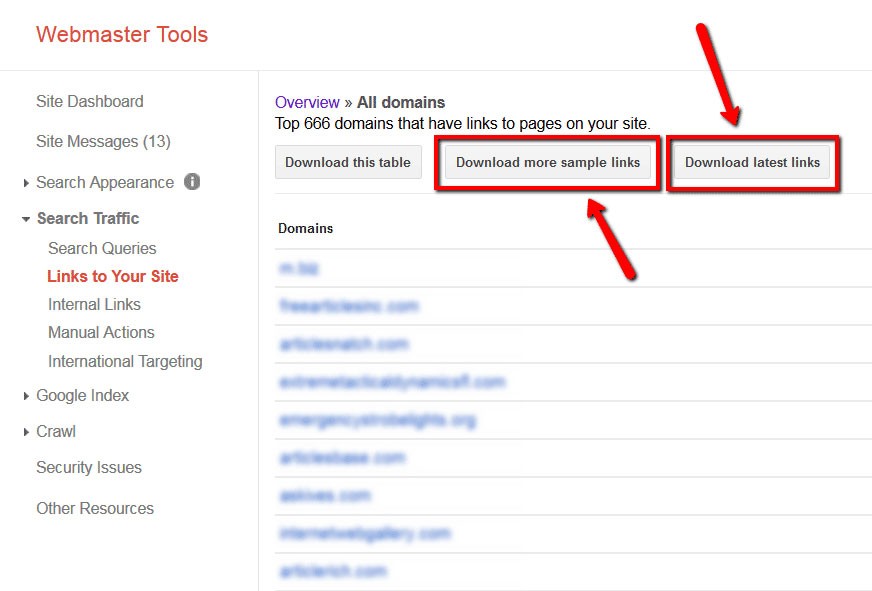
Open the Links report in Google Search Console, which lists the sites that link to you, and export it so you can review each link.
Before you learn how to disavow toxic backlinks, you should be able to find all the backlinks to your website. Tracing all your backlinks will help you identify which are the good backlinks and the toxic ones. Finding all these backlinks is not an automatic process, and you will need to get a tool that is customized in searching for backlinks.
There are numerous Backlinks checkers available at your disposal. Backlink checkers show how many backlinks you have and which websites they come from.
One of the easiest tools that help you find your backlinks is the Google Search Console. Google Search Console is Google’s free tool for website owners. Its Links report shows your top linking sites and latest links, and Search Console does not label any link as good or bad, so you decide which links are natural and which are unnatural.
What are the benefits of backlinks?
Good backlinks send visitors to your site and help Google see your site as trusted, which can help your pages rank.
- Backlinks serve as an endorsement for your content and website. A link shows that another website approves of what you offer.
- Backlinks give relevance to your website
- Backlink improves your rank position, improving the chance of users finding you when they search.
- Backlinks deliver traffic to your website.
- Backlinks help to improve your brand.
FACT: Google says that “in most cases, Google can assess which links to trust without additional guidance, so most sites will not need to use” the Disavow links tool.
Bad links Sources
Different search engines might have different policies in regards to listing good and bad backlinks. Google has regularly updated its bad links list based on SEO trends.
Sources of Bad Backlinks
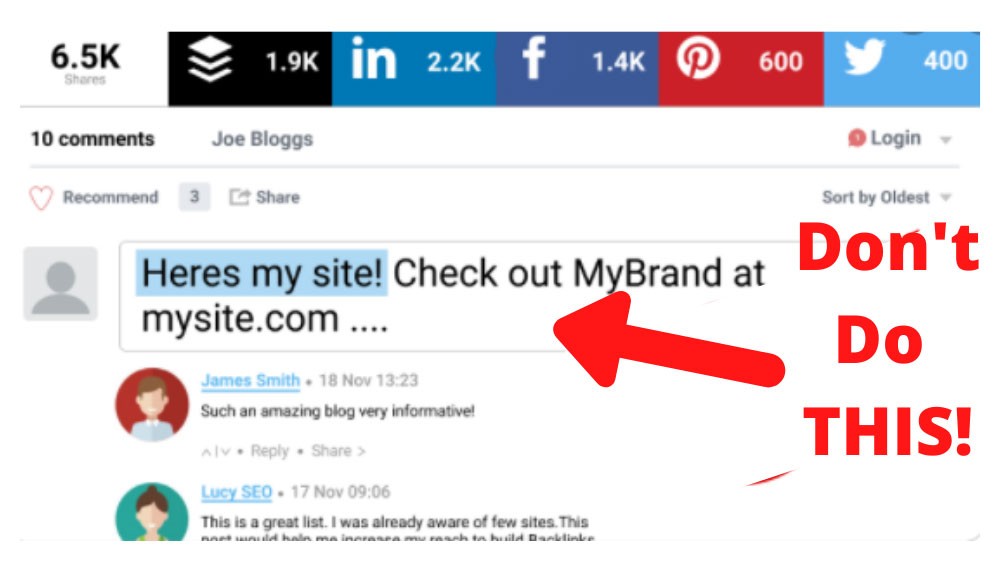
- Comments in blogs. Comments link spuming is a technique that has been on the rise in numerous blog posts. Google considers this as a source of bad links. You should, therefore, disavow backlinks from such sources. This is a prime example of what NOT to do:
- Footer links. Footer links were not an issue a few years ago. However, some publishers misused the Footer links on numerous occasions to improve their ranking. Google had to intervene and control the situation by listing them among the bad link sources.
- Spam site-wide links. Not all site-wide links are harmful to your website. However, you should watch out those site-wide links that use velocity links and spam techniques.
- Directory links from articles. Some articles have been used to numerously backlink a specific website making it unnatural and spammy. Google is quite keen on flagging such instances. You should, therefore, disavow backlinks from such sources.
- Fake forum profiles. Backlinks from fake forum profiles can hurt your website. You should avoid backlinks from them.
FACT: In Backlinko’s study of 11.8 million Google search results, the #1 result had an average of 3.8x more backlinks than the results in positions #2 to #10.
Steps to Disavowing/Removing Bad Backlinks
Now that you know how to look and the sources of bad backlinks, you should embark on how to remove them. Here are simple steps that you should follow:
- The first step is the identification of bad backlinks. From the above explanation on sources of bad links, you can easily spot the bad backlinks for your website.
- Search and Contact the owner of the website. After identifying the bad backlinks, you should source and contact the owner of that website.
- Ask the website owner to remove the backlink. It is easier if the owner can just remove the backlink for you. It will eliminate the need to go to the next step.
- Disavow the link and notify Google. If the website owner does not remove the link, you can move on to this step.
When should I disavow links?
Google says to disavow links only when you have a considerable number of spammy, artificial or low-quality links pointing to your site and those links have caused, or likely will cause, a manual action.
Most site owners rarely need to disavow links. The process of disavowing links is quite tedious and time-consuming. You should have in mind that you only disavow toxic or spammy backlinks. If you deny every backlink, you will end up hurting your website. Therefore, it takes time to sort out the good and bad backlinks.
Here are the situations where a disavow may be worth considering, plus one common situation where a disavow usually isn’t the answer.
- Ranking drops (usually not a reason to disavow): A drop in rankings or traffic on its own is not a reason to disavow links. Rankings move for many reasons, such as Google updates, new competitors and changes on your own site, and Google says it can usually work out which links to trust without your help. Check the Manual actions report in Google Search Console first. Only consider a disavow if Google has flagged unnatural links to your site, or if you find a large number of spammy links you didn’t build and can’t get removed.
- Manual Action: A manual action is a penalty a Google reviewer applies when your site breaks Google’s spam policies, and it can lower your rankings or remove pages from results. Google tells you about a manual action in the Manual actions report in Search Console. For an unnatural links action, Google recommends asking site owners to remove the links first, disavowing only the links you can’t get removed, and then requesting a review.
- Spam: When your website is spammed with negative SEO links. Spammers out there may decide to hurt your website ranking by spamming your site with harmful backlinks. I know it sounds malicious, but you should expect anything on the internet. When this happens, you should consider disavowing the spam links.
- Spammy Backlinks: When you notice spammy backlinks from your SEO agent. Some SEO providers buy links or build spammy links for their clients, and Google’s spam policies count buying links for ranking purposes as link spam. If you find links like these, ask the linking sites to remove them, then disavow the links that stay up.
How do I use Google’s Disavow links tool?
Make a .txt file that lists one URL or domain per line, then upload it on the Disavow links tool page for your verified Google Search Console property.
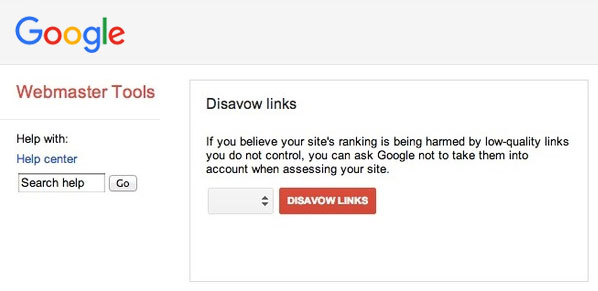
The Disavow links tool, which you can also call disown links tool, is made to disown or disavow bad backlinks for your website specifically. It is not often that you will find yourself using this tool. Google is quite particular on the tool and does not encourage their clients to use it unless it is indispensable. The disavow tool isn’t linked from the main Search Console menus.
The Google Disavow links tool was created in the year 2012, October. The tool was integrated as part of the Google Search Console. Google keeps the tool out of the main Search Console menus and calls the tool “an advanced feature” that “should only be used with caution,” because disavowing the wrong links can hurt your site in search results.
The new update of Google Search Console does not provide the tool automatically. To use the tool, you need a verified URL-prefix property in Google Search Console, because Google says the tool does not support Domain properties. You can only disavow links that point to a website you own and have verified. Here is what that page would look like:
Why Google Created the Disavow Links Tool
Google created this Disavow tool to let website publishers notify google that they disown certain links, and they should not be used in ranking their website. The disavow links tool helps publishers deal with bad links they can’t get removed from other websites. Violating Google terms may lead to dropping your site rank, losing traffic, and removal of your website.
Google has also been intensifying the fight on SEO attacks. The disavow links tool is a significant step that Google made to enforce and monitor its policies. The tool has been used numerous times in fighting spam backlinks.
Negative SEO backlinks planted by malicious attackers can be easily controlled and managed using the disavow link tool. You will need the disavow tool in case you find yourself in such a situation.
The disavow links tool is also handy when you want to recover your website from a manual action. You can use the tool to disown all the bad or spammed backlinks and notify Google to restore your website.
How to Use the Disavow Bad Links Google Tool
You can use the disavow bad links google tool for several reasons. Mostly you might find yourself using the tool in case Google has given your website a manual action or when you want to prevent violating Google terms. The tool can also be applied when your site is under negative SEO attack.
No matter the reason, you should know how to disavow a link. Here are a few steps you should follow to disown those bad backlinks.
- Generate Backlinks: The first step is to generate all backlinks associated with your website. Google Search Console’s Links report lists the sites linking to you, and third-party backlink tools can fill in more.
- Identify: Identify the spammy or bad backlinks. Google Search Console does not flag individual links as bad, so you need to review the list yourself. If you have an unnatural links manual action, start with your top linking sites and latest links.
- Counter Check:However, you can counter check other backlinks from the backlinks report and consider them for disavowing. You can consider doing this if the backlink is from a spammy site or low-quality links or if the backlink might cause or have caused a manual action against your domain.
- Compile List: Compile the backlinks to disavow. After identifying all the spammed backlinks, you should create a list that instructs Google on which backlinks to disavow.
- Disavow File Generator: You can write the file yourself or use a disavow file generator. Google’s rules are simple: a plain .txt file in UTF-8, one URL per line, or “domain:example.com” to disavow a whole site, with a limit of 100,000 lines and 2MB. Lines that start with # are ignored, so you can use them for notes.
- Upload File: Upload the disavow list text file. When your text file is ready, you can now upload it using the disavow links tool page.
How to Upload the Disavow List File
Uploading the disavow file takes a few minutes.
- Open the disavow links tool page
- Choose your domain
(Image credit: Neil Patel)
- Select ‘Disavow links’
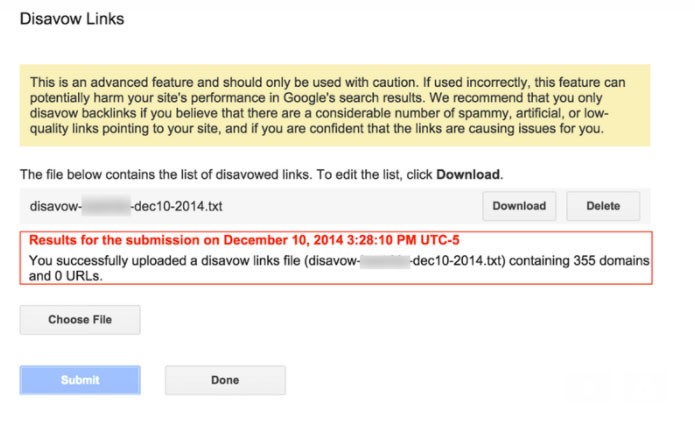
(Image credit: Neil Patel)
- Select ‘Choose file.’
- Choose the file from your computer and click ‘Upload.’
After completing these simple steps, all you have to do is wait. Google says it can take a few weeks to work your list into its index. Uploading a new file replaces your old list, so always upload the full list, not just the new links.
Disavowed backlinks keep appearing in your backlinks report after you upload the file. However, Google will ignore these links when ranking your website.
Risks of Disavowing Links
As we earlier learned, disavowing links can be a tedious and tricky process. It is sometimes quite hard to determine which backlinks need to be flashed out. If Google has not flagged any of your backlinks, you will need to do the investigative process yourself. We would highly recommend you consult a professional before you embark on disavowing.
Let us look at the risks of disavowing links.
- You might end up disavowing good backlinks, so take care when you decide which links are spammy.
- Your rankings or traffic can drop. Google warns that, used incorrectly, the disavow tool “can potentially harm your site’s performance in Google Search results.”
When you’re not sure a link is harmful, leave it alone. Google can usually work out which links to trust on its own, and disavowing a good link can cost you rankings and traffic.
What should you remember before you disavow links?
Most sites never need to disavow links, so try getting bad links removed first and disavow only what you can’t remove.
I hope we have answered most of your burning questions about the disavowing of backlinks. Backlinks are essential if you want to improve your rank and brand. They are also vital in creating traffic and relevance to your site. Having a good backlink from a credible and high-quality website adds more value to your ranking. However, you should avoid backlinks from low-quality sites and spam comments on a blog.
You should also understand the entire process of removing bad backlinks from your site. It is wiser first to consider contacting the owner of the other website rather than jumping into the disavowing process. In some instances, bad links might come from sites that intend no harm to you. No matter the intention, you need to be keen on identifying if the backlink is harmful or not.
Google updates its terms regularly. You should ensure you remain updated about SEO issues. As they say, ignorance is no defense. Being updated saves you from repercussions of avoidable mistakes.
Before embarking on the disavowing process, you should be very cautious. You should know that the process would have a negative effect in case you disown good backlinks. You are likely to drop in your rank and lose traffic if you disavow either bad or good backlinks.
Google ignores most spammy links on its own, so you don’t need to act on every bad backlink you find. Save the disavow tool for a manual action or for a large number of spammy links you can’t get removed.
FAQ’s
A disavow file is a plain .txt file in UTF-8 that lists one URL per line, or “domain:example.com” to disavow a whole site. Google allows up to 100,000 lines and 2MB and ignores lines that start with #. Upload the file on the Disavow links tool page for your verified URL-prefix property in Google Search Console.
In SEO (search engine optimization), disavowing a link means asking Google to ignore a link from another website when it judges your site. You do it by uploading a list of links or domains to Google’s Disavow links tool. The link stays on the other site, but Google ignores it when ranking your site.
A Google penalty most often means a manual action, which is when a Google reviewer finds that your site breaks Google’s spam policies. A manual action can lower your rankings or remove pages from results. Google tells you about a manual action in the Manual actions report in Google Search Console.
A ranking or traffic drop alone is usually not a reason to disavow links, because rankings move for many reasons, such as Google updates and new competitors. Check the Manual actions report in Google Search Console first. Consider a disavow only if Google flagged unnatural links or you find many spammy links you can’t get removed.
Most sites do not need to disavow bad links, because Google says it can usually work out which links to trust without extra guidance. Ask site owners to remove bad links first, and disavow only the links you can’t get removed when they have caused, or likely will cause, a manual action.
Google says it can take a few weeks to work a disavow list into its index. Disavowed links keep appearing in your Search Console links report, but Google ignores them when ranking your site. Uploading a new disavow file replaces your old list, so always upload the full list, not just the new links.