Among the most practical and the quickest methods to get a lot of traffic to your website is to get your webpage on the first page of the Google search engine. Ranking on page one makes sense because a single popular keyword can send a steady stream of visitors to your website.
If your webpage shows up near the top of Google for even a few popular keywords, you’re likely to get a reasonable amount of traffic each month. The catch is that it’s often hard to get your page in the top 10 results of Google for a popular keyword because there are lots of people and companies competing against you.
Fortunately, plenty of keywords still get steady traffic and have low competition. For website owners, these are the golden nuggets that they can pick to get a decent amount of traffic on a regular basis. In this article, we will discuss how you can find such keywords that offer a high traffic volume and low competition.
To find these golden nuggets, you can use several reputable websites that will allow you to filter your results based on how difficult it’s for you to rank for the desired keyword.
What is Keyword Difficulty?
A keyword difficulty score measures how hard it is to rank for a specific keyword in a search engine like Google.
Where can you get a keyword difficulty score?
Keyword research tools such as Ahrefs, Moz and KWFinder give you a keyword difficulty score. We will discuss these tools in a while. Before that, the following few paragraphs describe what SEO (search engine optimization) difficulty means.
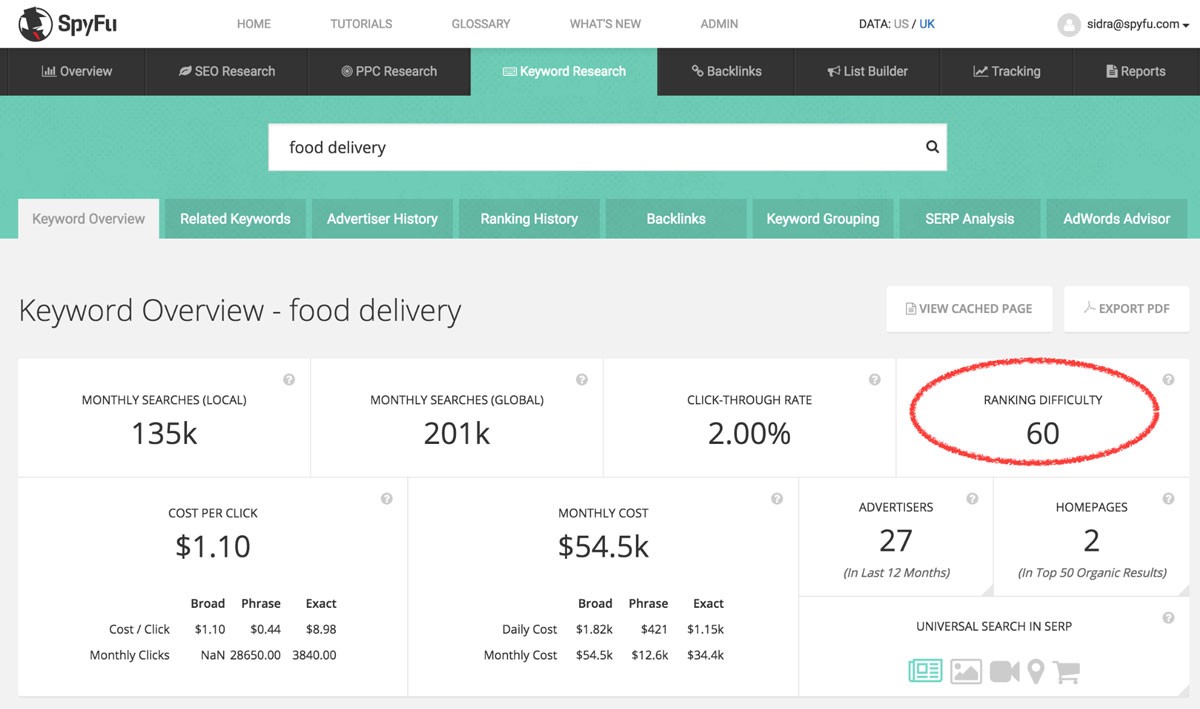
If you use a keyword explorer, you will notice that almost all of the major platforms attach a numerical value between 0 to 100 to a keyword. The score represents the degree of difficulty to rank for that keyword in a major search engine like Google. The higher the score, the more difficult it is to rank for that particular keyword. Here is an example using the keyword “food delivery”:
(Image Credit: SpyFu)
For instance, if you are an auto dealer in Bayonne, New Jersey and want to rank for the keyword “buy used cars”, you can use a variety of different keyword tools to get thousands of relevant keywords and the difficulty score associated with each.
In the auto dealer example, a good keyword tool will let you view the SEO difficulty score of the keyword “buy used cars” and hundreds of related queries. Since “buy used cars” is a generic keyword, it may have a very high score above 90 making it almost impossible to rank for. On the other hand, you may find that certain long-tail-keywords such as “buy used cars in Bayonne New Jersey” have a decent amount of search traffic and a low SEO difficulty score making it more practical to target for your keyword campaign.
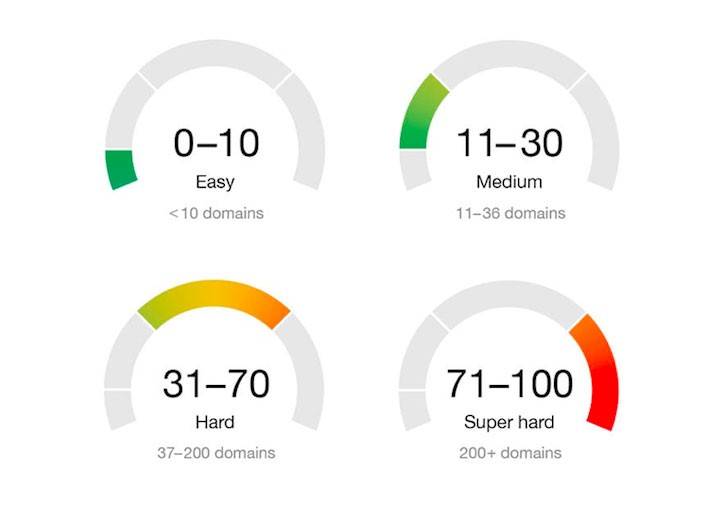
If you’re using more than one tool to get keyword difficulty, it’s also important to realize that every software has different parameters on how they rank keywords. In other words, a score of 30 on one keyword checker tool may not correlate to a score of 30 on another keyword tool.
To make things a little easier, many keyword tools provide a range to understand their metrics.
(Image Credit: WordStream)
Ideally, you would want to stick to one or a maximum of two keyword tools. It’s recommended to take a free trial to understand each keyword platform before subscribing to use their data.
A keyword difficulty score estimates how hard it is to rank in the top 10 spots in a typical search engine. A score of 5 means that it is generally easy to rank for the top ten positions in a search engine for a particular keyword.
Before going any further, here is an overview of how these websites measure web page difficulty and how you can use the insight to improve your rankings.
How is the keyword difficulty measured?
To measure the difficulty of a keyword, most keyword tools are based on the premise that there are only a few basic factors that play an important part in ranking a web page.
After interpreting hundreds of different factors that Google uses to rank a web page, experts seem to have concluded that only certain factors are critical to ranking. To get keyword difficulty, the SEO difficulty score mainly looks at the following factors:
- Content of the page: Keyword tools look at page factors like the title tag, the headline and how well the content covers the topic of the keyword.
You can often improve your chances of ranking higher by improving these on-page factors. Repeating a keyword over and over won’t help, because Google’s spam policies treat keyword stuffing (filling a page with keywords to manipulate rankings) as spam.
- Links for other websites: Links from other websites (backlinks) help pages rank, and Google says its core ranking systems look at how pages link to each other.
Usually, the difficulty score for a certain keyword is low if the web page on the top 10 results does not have many external links.
- Domain authority: Domain Authority (DA) is a score from 1 to 100 created by Moz that predicts how likely a website is to rank compared with competitors. Moz says DA is not a Google ranking factor. Building Domain Authority usually takes a long time, and a high score is usually harder to raise than a low one.
A keyword tool will let you know the DA score of websites in the top 10. A high keyword difficulty score often means several high-DA websites dominate the results.
This overview of how the difficulty score is measured isn’t complete, but it gives enough information to understand the concept.
Now that you understand what SEO difficulty means, let’s discuss how to check keyword difficulty and how you can tweak the results in your favor.
How to check keyword difficulty?
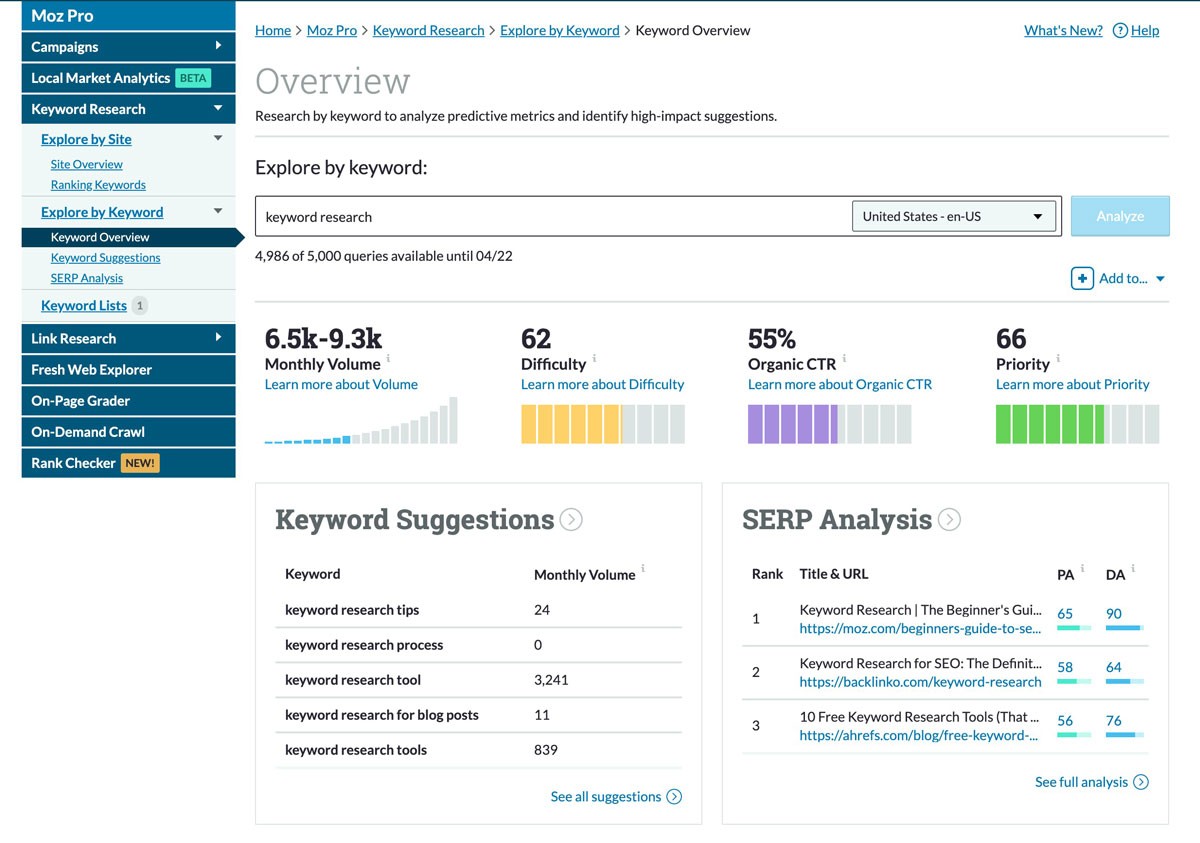
You can check keyword difficulty by typing your keyword into a keyword research tool such as Ahrefs, Moz or KWFinder. These three tools are popular, but you can try others through a quick Google search. The image below shows Moz’s keyword difficulty tool:
(Image Credit:Moz)
Most of these websites offer a monthly subscription and multiple plans to choose from. You can select the plan based on your desired level of keyword research. If you want to take one for a test drive, check whether it offers a free trial or a free plan.
After the subscription, you will get access to the keyword dashboard where you can input your keyword to find hundreds of keywords related to your niche. Each keyword and hundreds of similar keywords can be sorted out by their respective difficulty scores.
How to use these tools to your advantage?
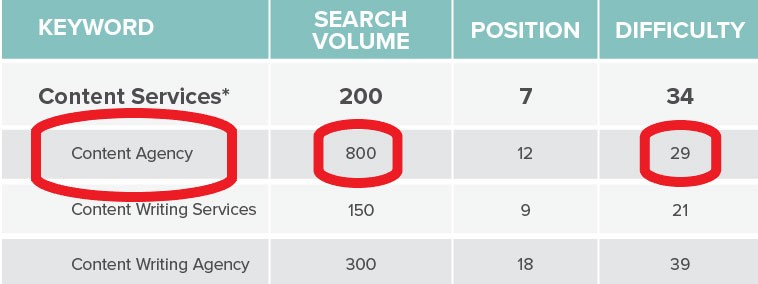
To use a keyword tool effectively, filter for keywords that have a relatively high search volume and a low difficulty score. Filtering this way lets you tap into hundreds of keywords that are easy to rank for. For example:
(Image Credit: Brafton)
Don’t ignore keywords that get only a few hundred searches a month. Low search volume keywords are often much easier to rank for. Ultimately, you can build a list of these low volume and low difficulty keywords to get a reasonable amount of traffic each month.
You should also look out for synonymous and similar words. A lot of time we ignore related keywords that may give us better results. There are also additional opportunities from long-tail keywords that are ripe for the taking.
How to tweak your webpage to get the top 10 rankings?
Once you have selected the desired keyword, look at the most important parameters of the top 10 web pages provided by the keyword tool. The keyword tool will likely show details about the factors that make up the difficulty score. You may see Domain Authority, Page Authority, Number of Backlinks, the Age of the Web Page, the Title Tag, Keywords in the Content, and other important info.
To keep things simple, most tools show only a handful of these factors by default.
After selecting your keyword, look at these parameters to see if something stands out that may make the job easier or difficult. For instance, it’s possible that you may find a reasonable keyword to target but most of the pages in the top 10 are high DA pages. If you’re a new website with a low DA score, getting in the top 10 may prove difficult due to the anomaly.
On the other hand, you may also find great opportunities by looking at the parameters. Instead of a high DA score, you may find that there are three or four new web pages that are no older than a month. Young pages with few backlinks are often easier to compete with, so a new website may be able to outrank them by doing better on a few key factors.
While the keyword score offers an overview of the difficulty, it’s also important to look for such anomalies before deciding to tweak your webpage.
Another useful trick is to check search intent, which is what searchers actually want when they type a keyword. Look at the top five pages to see what they offer that your page doesn’t. For example, Ahrefs reports that its own landing page for “backlink checker” wasn’t ranking well. The top-ranking pages offered a free backlink checker tool, and Ahrefs’ page didn’t. After Ahrefs added a free tool to the page, Ahrefs says traffic to the page grew 516% in less than six months.
How long does it take to reach the top 10?
There is no fixed timeline, and no one can guarantee a top 10 ranking. Google first has to crawl your updated page, and Google says crawling can take anywhere from a few days to a few weeks. After that, your ranking depends on how your page compares with the pages already in the top 10.
As a rule of thumb, you will see quicker results for comparable keywords if you have an established website. Slower results for new sites are one reason a new website should mostly target easy keywords.
It’s also important to remember that you may see a gradual increase in rankings. Your page may climb a few positions at a time over weeks or months. Picking low difficulty keywords with a keyword tool gives you a better chance of seeing progress sooner.
Top 5 keyword tools to search for low competition keywords
- Ahrefs Keyword Explorer: Ahrefs Keywords Explorer is one of the best-known keyword tools. According to Ahrefs, Keywords Explorer shows Google search volume for 217 locations, along with Keyword Difficulty, traffic potential and the backlinks pointing to the top-ranking pages. Ahrefs doesn’t advertise a free trial for Keywords Explorer, so check current pricing before you sign up.
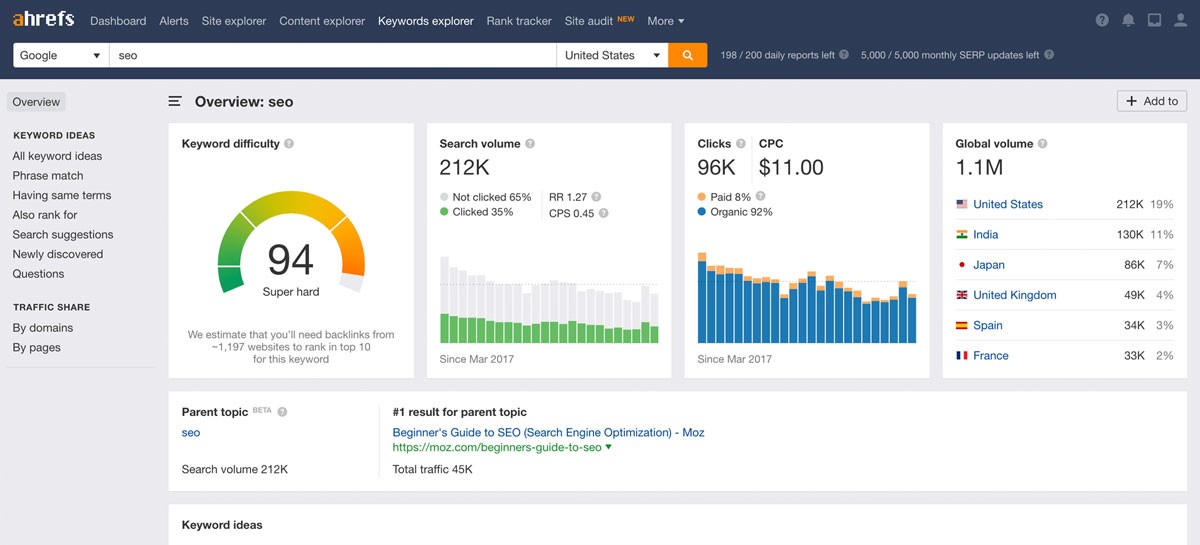
(Image Credit: Ahrefs)
- Moz Keyword Explorer: Moz Keyword Explorer is another popular keyword tool. Like Ahrefs, Moz offers many different metrics to help you evaluate keywords. To start, put your own URL, which will give Moz a general idea about your website so it can help you get better results. If you are testing Moz and Ahrefs, just remember that there may be a visible difference in how the two tools evaluate the keywords score. Therefore, it’s recommended to use only Moz or Ahrefs unless you can understand all the nitty-gritty that goes into analyzing the difficulty of scoring a keyword. (There is an earlier image that shows an example of this tool.)
- LongTail Pro: LongTail Pro focuses on finding long-tail keywords (longer, more specific searches) and shows several metrics for each one. The LongTail Pro website also offers training for website owners who want to increase traffic. Check its website for current trial and pricing options.
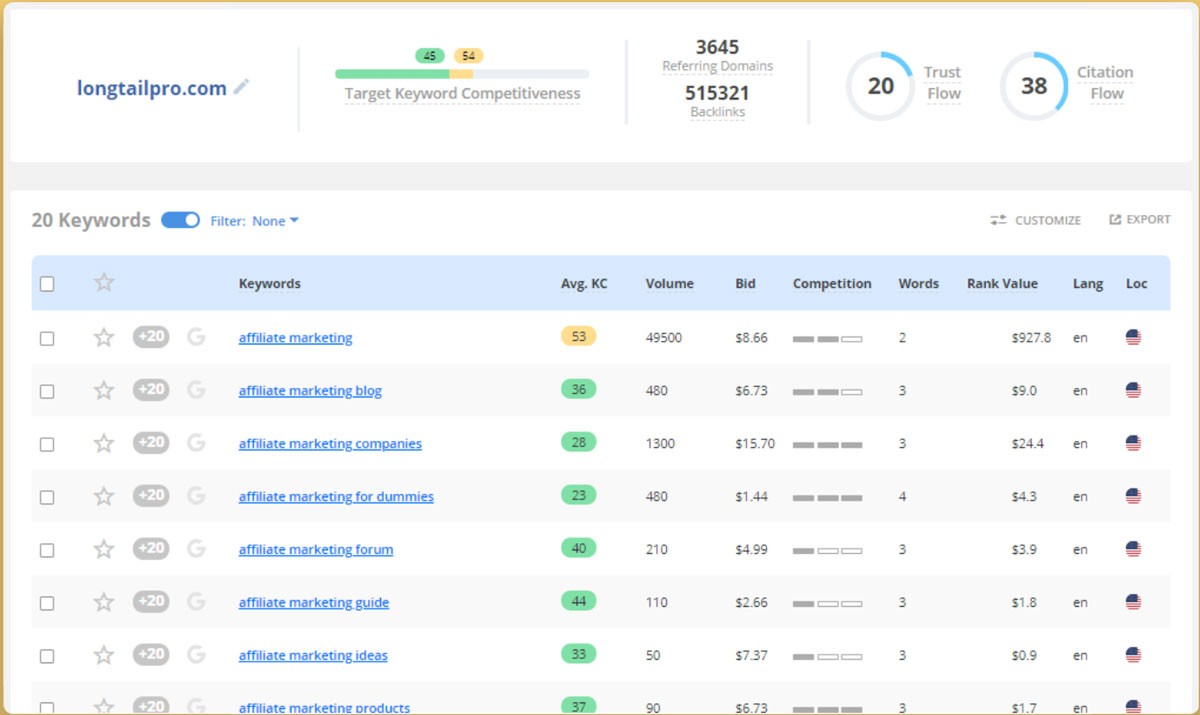
(Image Credit: LongTail Pro)
- KWFinder: KWFinder is a good fit if you are new to keyword difficulty. The KWFinder interface is easy to read and explains the factors behind each keyword’s difficulty level. Check its website for any free searches before you subscribe.
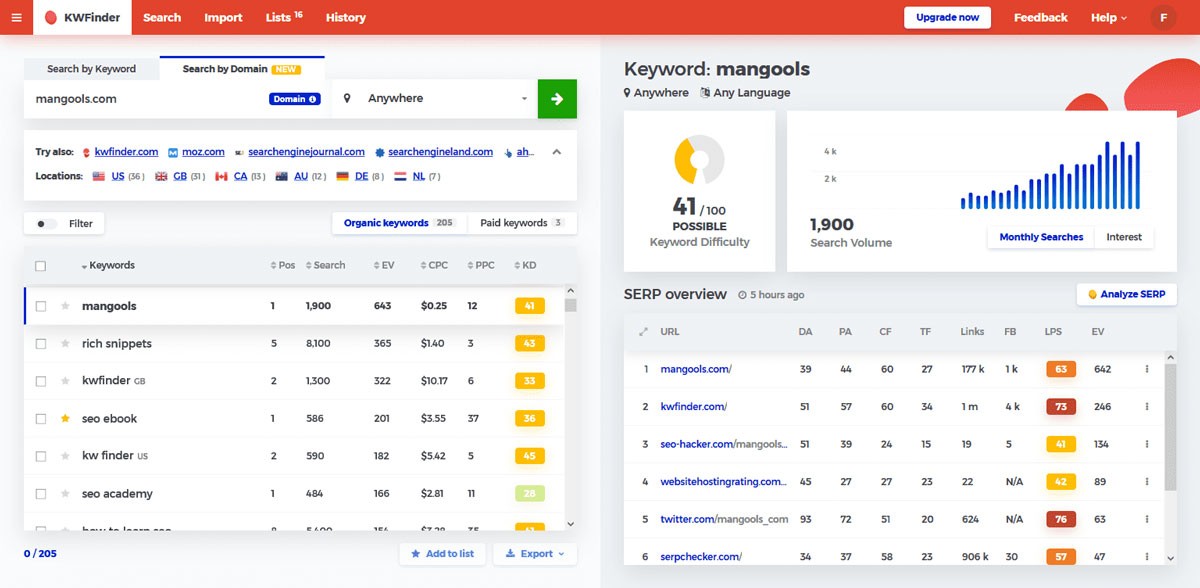
(Image Credit: KWFinder)
How can diib help you monitor your keywords?
diib tracks the keywords your site ranks for and turns the data into plain-English tasks you can act on.
There are also other useful online platforms for keyword competitiveness data, which you may find useful. These include SEMrush, KeywordTool.io, Sistrix, and SECockpit. Before using more than one tool, just remember that each platform has different methods to evaluate the difficulty score. diib monitors your keywords and rankings and recommends simple tasks to improve them. Here are some of the features in diib:
- Keyword, backlink, and indexing monitoring and tracking tools
- Core Web Vitals monitoring
- Bounce rate monitoring with tips to improve it
- Facebook and Instagram Insights (post clicks, page visits and more) and YouTube video performance
- Broken pages where you have backlinks (404 checker)
- Technical SEO monitoring, including monitoring keyword difficulty
Click here for your free scan. diib members also get diibLive office hours with diib’s growth experts.
FAQ’s
There is no single good keyword difficulty score, because each tool calculates it differently. Keyword difficulty usually runs from 0 to 100, and a lower score means it is easier to reach Google’s top 10. A new website should mostly target low difficulty keywords and only compare scores from the same tool.
Most keyword tools calculate keyword difficulty by looking at the pages already in Google’s top 10 for that keyword. They mainly check how well those pages cover the topic, how many backlinks (links from other websites) they have, and the Domain Authority (DA) of their sites. Each tool weighs these factors differently.
How competitive a keyword is depends on the pages already ranking for it. If the top 10 results come from high Domain Authority (DA) sites with many backlinks, the keyword is hard to win. If young pages with few backlinks rank there, a smaller site has a better chance. A keyword difficulty score sums this up as one number.
A good keyword gets a steady number of searches, has a low difficulty score and matches what searchers actually want. Broad terms like “buy used cars” are often too hard to rank for. Longer, more specific phrases like “buy used cars in Bayonne New Jersey” usually face less competition and are more practical targets.
There is no ideal keyword density to aim for. Repeating a keyword over and over won’t help you rank, and Google’s spam policies treat keyword stuffing (filling a page with keywords to manipulate rankings) as spam. Instead, use the keyword naturally in your title tag and headline, and make sure the page fully covers the topic.