Domain Authority (DA) is a 1 to 100 score, created by the SEO (search engine optimization) software company Moz, that predicts how well a website is likely to rank based mainly on the links pointing to it. A higher Domain Authority score means a site has a stronger link profile than sites with lower scores. A good Domain Authority score is one that is higher than the scores of the websites you compete with in search.
Domain names are often overlooked when choosing a new web address. Yet a domain name plays a role in establishing trust and credibility online. A high Domain Authority score suggests a site has earned links from many other websites, but Domain Authority is a Moz score, not a Google one, and Google does not use it to rank pages. Sites with strong link profiles still tend to show up more often in search results, which gives visitors more chances to click through to them.
There are various tools for measuring domain authority on your website or other websites you manage. You can use these tools to measure your domains and compare them with others.
What Is a Domain Authority Score?
A Domain Authority score is a 1 to 100 number from Moz that estimates a website’s ranking strength, mostly from how many different websites link to it and how strong those linking sites are.
Domain Authority is not Google’s PageRank. PageRank is Google’s own link-based system, which Google calls one of its core ranking systems since launch, and Google does not publish a PageRank score for any site. Domain Authority is a separate estimate made by Moz, and a higher score goes along with better rankings without causing them.
How does Domain Authority work?
Domain Authority works by counting the links that point to a website from other websites and weighing each link by the strength of the site it comes from.
Domain Authority borrows the basic idea behind Google’s original PageRank system: links from other pages act like votes. A site with many links from trusted websites usually earns a higher score than a site with few links or none.
To better understand how PageRank works, consider it a game where we’re trying to pass the information along via the Internet. Each web page contains valuable information. If someone comes along and visits our page, they pick up some of the information from us. Then, as time passes, that person can share some of their knowledge with others visiting their websites. When this happens, those people pick up some of our information. Eventually, it spreads around the whole world.
Each page needs at least one link coming out of it in this same manner. Otherwise, a visitor wouldn’t know anything. That’s why the first step in calculating PageRank involves counting all the outgoing links. There are two types: external and internal.
- External links come from outside sources, such as another website, while internal links come from within the same website. A typical example of an external link might be a hyperlink to Wikipedia.org in a web page’s footer.
- An internal link would include a reference to another page in the same directory. Both types of links tell search engines which pages are popular. Internal links help Google understand which pages on your own site matter most, while links from other websites are what drive scores like Domain Authority.
***Did you know??
- A Backlinko study of 11.8 million Google search results found that the number of different websites linking to a page correlated with higher rankings, and the #1 result had about 3 times more linking domains than results in positions 2 to 10 (Backlinko)
- An Ahrefs study of about 14 billion pages found that 96.55% of them get zero traffic from Google, and a lack of backlinks was one of the three main reasons (Ahrefs)
Does a good Domain Authority score mean your website is healthy?
Not by itself, because Domain Authority only reflects your links, so you also need to check content, speed, engagement and traffic to judge your website’s health.
Many factors go into whether a website is healthy. Here are some warning signs that may point to a problem:
Poor Content
People visiting a site should quickly understand the area’s purpose. If visitors aren’t reading the copy written by the designer/developer, they probably won’t stick around long enough to learn anything new.
Slow Loading Speed
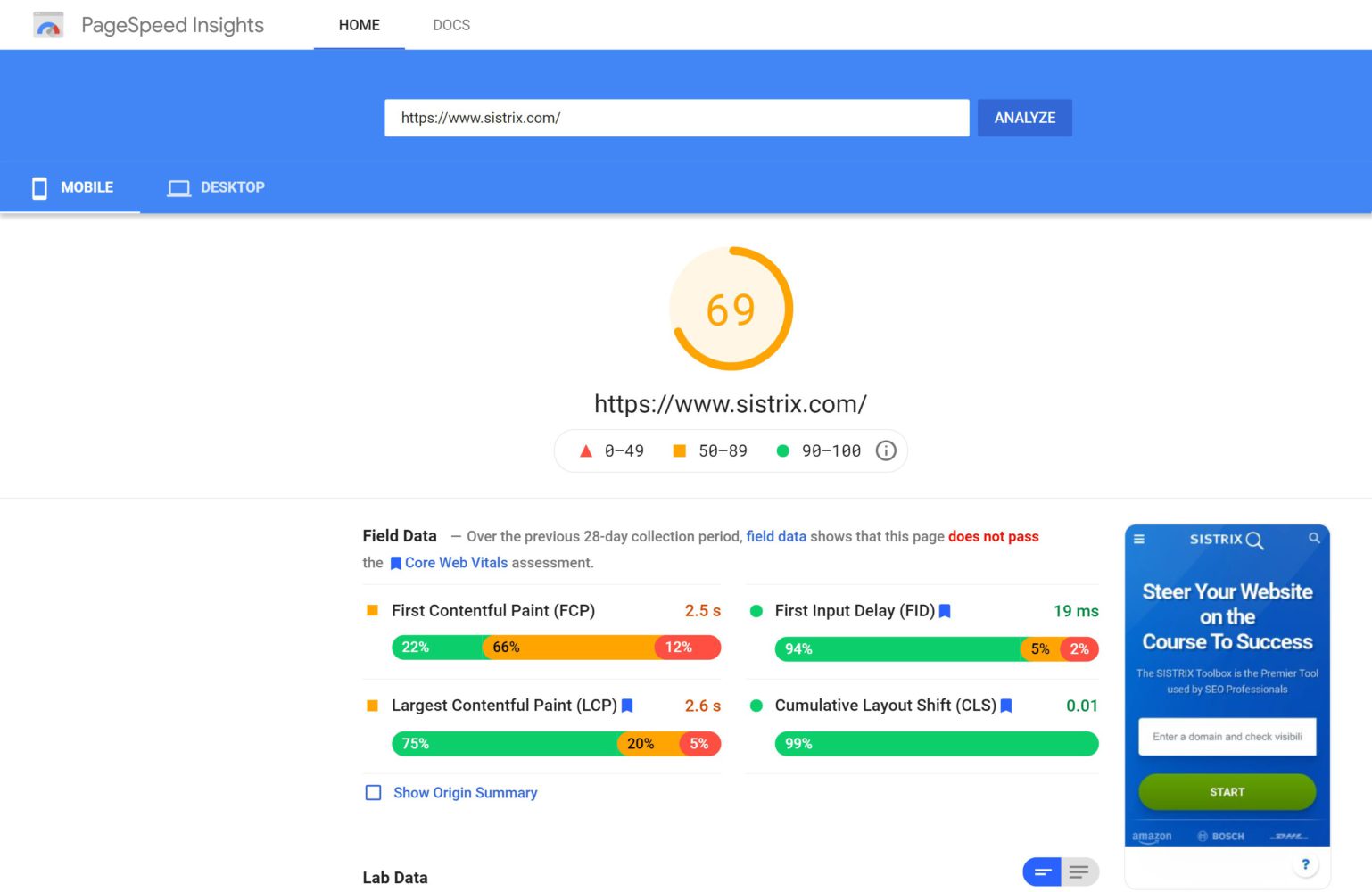
Loading time matters when you evaluate a website. Google’s Core Web Vitals guidance says the largest piece of content on a page should load within 2.5 seconds for a good user experience. A slow site also looks less professional. Use tools such as Google’s PageSpeed Insights to help your loading speed. For instance:
(Image Credit: SISTRIX)
Poor Backlinks
Backlinks are links pointing to your website. The higher the quality of these backlinks, the better. Ensure there is no overuse of guest posting, as this isn’t considered SEO friendly. Guest blogging only makes sense with high-quality content and strategic keywords when done correctly.
High Bounce Rate
A high bounce rate can be a sign of poor usability. Users should be able to find what they are looking for without searching around. Easy navigation helps more visitors convert.
Low Conversion Rates
The last thing you want is for users to leave after clicking a button. You want them to take action. You need to have clear calls to action and offer quick results to do this.
Poor Engagement Metrics
Most importantly, you need to track if users like your content. Many sites don’t bother monitoring engagement, as it takes up too much work. However, programs like Google Analytics allow you to monitor several key metrics that will give you insight into your website’s performance.
Low Traffic Numbers
Traffic is how users get to your site. A significant drop in traffic shows that people aren’t finding your website through organic (unpaid) search. A drop like that means you should also build visibility through other channels, such as social media marketing and paid advertising.
Slow Server Response Time
Server performance determines how fast a site loads. When a server responds slowly, every page on the site loads slowly, and visitors are more likely to leave.
Which tools can check your Domain Authority and website health?
Moz shows its own Domain Authority score, while tools like Google Search Console, Ahrefs, Semrush, WebPageTest and Similarweb show related link, traffic and speed data.
The following tools can help you evaluate the links and overall health of a specific website:
Search Console
Search Console is one of the most valuable tools that can measure the health of your website. While this tool is free, you have to create an account first. Once you verify your site, Search Console shows your search clicks, impressions, indexing issues and the sites that link to you. Search Console does not show a Domain Authority score.
Ahrefs
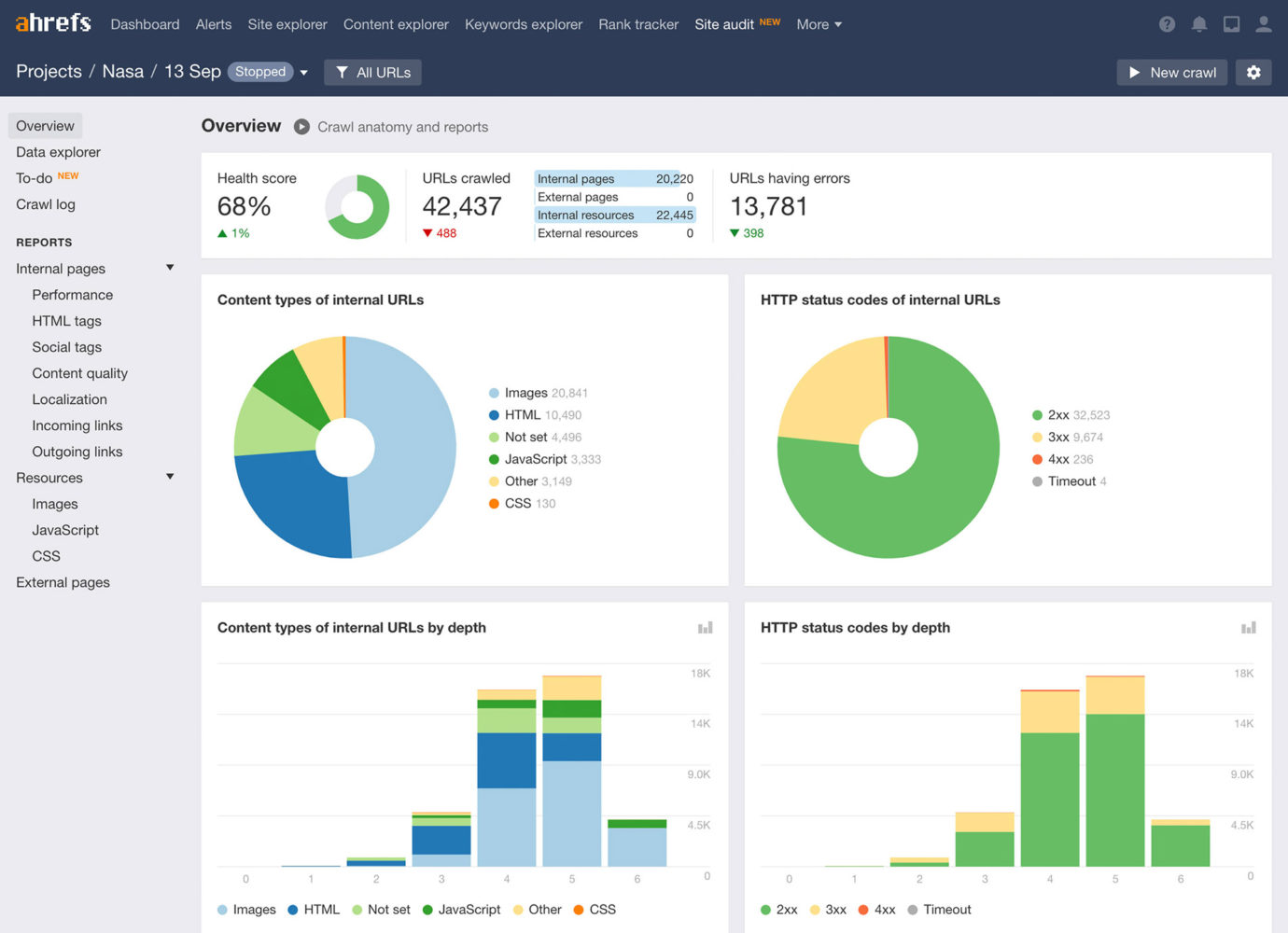
Ahrefs is another excellent website health checker if you’re looking for an alternative to Google Search Console. This program offers several features, including backlink analysis, keyword research, and site audits. Unlike Search Console, Ahrefs is a paid tool, so check its pricing page for current plans.
(Image Credit: Syntactics, Inc)
SEMrush
An online service like SEMrush provides many benefits, from link-building reports to its own link-based Authority Score. SEMrush lets you see how well your competitors rank for their terms and compare yourself to others. SEMrush also shows estimated rankings and traffic for your own site.
WebPageTest
As mentioned above, slow page speeds may cause customers to leave, but a website that loads more slowly than expected will damage a brand’s reputation. WebPageTest allows you to test your site’s performance across devices and browsers. This way, you can ensure that your site is loading optimally for mobile and desktop users.
SimilarWeb
SimilarWeb estimates how much traffic a website gets and which countries that traffic comes from, so you can compare your site with well-known competitors. SimilarWeb can also help you spot potential markets to target if you want to grow your international presence.
Why does a good Domain Authority score matter?
A good Domain Authority score matters because it shows how your link profile compares with competing sites, which hints at how hard those sites will be to outrank.
A high-quality domain name plays a crucial role in the success of your business. It’s no secret that consumers trust brands with reliable domain names when deciding whether to purchase products or services.
A domain name on its own does not raise Domain Authority. Links from other trusted websites do, which is why a good name and a steady effort to earn links work best together.
How do you choose the right domain name for your business?
Choose a domain name that is short, easy to remember and clearly tied to your business, keeping in mind that every new domain starts with a low Domain Authority whatever it is called.
When choosing a domain name for your business, you should always start by thinking about what kinds of keywords your audience might search for. Many companies go straight for .com domains because they believe there’s nothing better. However, a .com doesn’t necessarily mean that your business will rank highly for those terms. A generic .com name does not raise the Domain Authority of your website on its own.
It’s far more effective to focus on specific keywords instead. You need to find something that’s both relevant and memorable. For example, let’s say you sell gardening supplies. Your ideal customer might search for “best garden soil” rather than “gardening soil” or “garden soil.” The former will be more likely to turn up results for your business.
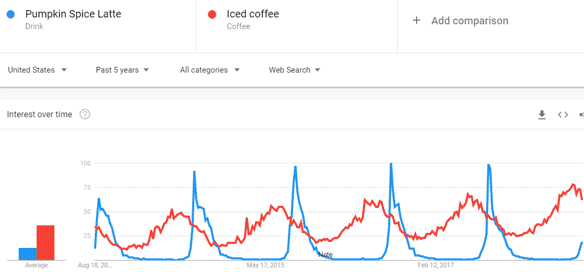
When you have a list of keywords, you can narrow down the options using tools like Google Trends. Start typing in any terms and clicking on some suggested sites. See where they appear before moving forward. Using this method, you’ll be able to get an idea of the competition for each term. Here is an example:
(Image Credit: Authority Labs)
You’ll also want to consider what kinds of extensions people usually use for popular searches. There are several ways to find them:
Go to Google Keyword Planner and enter your keyword(s) to see related search phrases and variations of your keyword.
- Use the Google Autocomplete feature. Type your keyword into Google search and look at the drop-down menu of suggestions that appears. Note the suggestions that make sense for your business.
- In the URL bar when you visit a site. Most pages will have a section called “URL.” In it, you’ll see a long string containing numbers and letters. The ending after the last period in a domain (such as .com or .org) is the domain extension the site chose.
- Visit websites and look for clues to their URL structure. If you’re lucky enough to work with a web designer or developer, they will often provide their contact information if you have any questions. Otherwise, you can try asking other people who have done similar projects.
- Check out the URLs of competitors. When researching your domain name choices, you must check out your competition to understand what makes theirs unique. You can also learn from their mistakes and increase the domain authority of your website.
Consider using a subdomain. If you already own a .com domain, you can add a subdomain (such as shop.yourbusiness.com) for new features without buying a whole new domain.
- Check out available names and suffixes. You can buy domains with many endings, such as .co, .org or .net. You can also buy country code top-level domains (ccTLDs), such as .uk, .ca or .au, which tie a website to one country.
- Buy a premium domain. While many brands use.com domains, plenty of others opt for different endings. Premium domains include.club,.design,.news,.store, etc. You can usually find these at higher prices.
- Register for social media profiles. Having a presence on sites like Facebook, Twitter and LinkedIn allows you to reach a wider audience. Social profiles that match your domain name also build brand awareness among potential customers.
What is a Good Domain Authority Score?
A good Domain Authority score is one that is higher than the scores of the websites you compete with in search, because Domain Authority is a comparison tool rather than a pass or fail grade.
There is no single number that counts as good for every site. A local plumber competing against other local plumbers does not need the score of a national news site. To find your target, look up the Domain Authority of the sites that rank on page one for your most important searches, then aim to match or beat them over time.
- Check the Domain Authority of the top-ranking sites for your main searches
- Compare your score with those sites, not with big national brands
- Track your score over time, since Domain Authority changes as your links change and as other sites’ links change
- Focus on earning links from relevant, trusted websites
How Long Does it Take to Increase Domain Authority?
There is no set timeline for raising Domain Authority, because the score depends on when Moz finds new links to your site, and it can also move as other websites gain or lose links.
These steps make your site stronger overall, but only earning links from other websites raises Domain Authority directly:
Check Page Speed
To check whether your site is loading correctly, go to Google’s PageSpeed Insights tool. PageSpeed Insights scores each page and lists specific fixes, so work through the biggest issues first.
Add External Links
Earn high-quality backlinks by creating content other websites want to cite and by getting listed in relevant local and industry directories. Avoid paying for links, because Google’s spam policies treat buying links for ranking purposes as link spam. Also, link out to authoritative sites when they help your readers.
Optimize Images
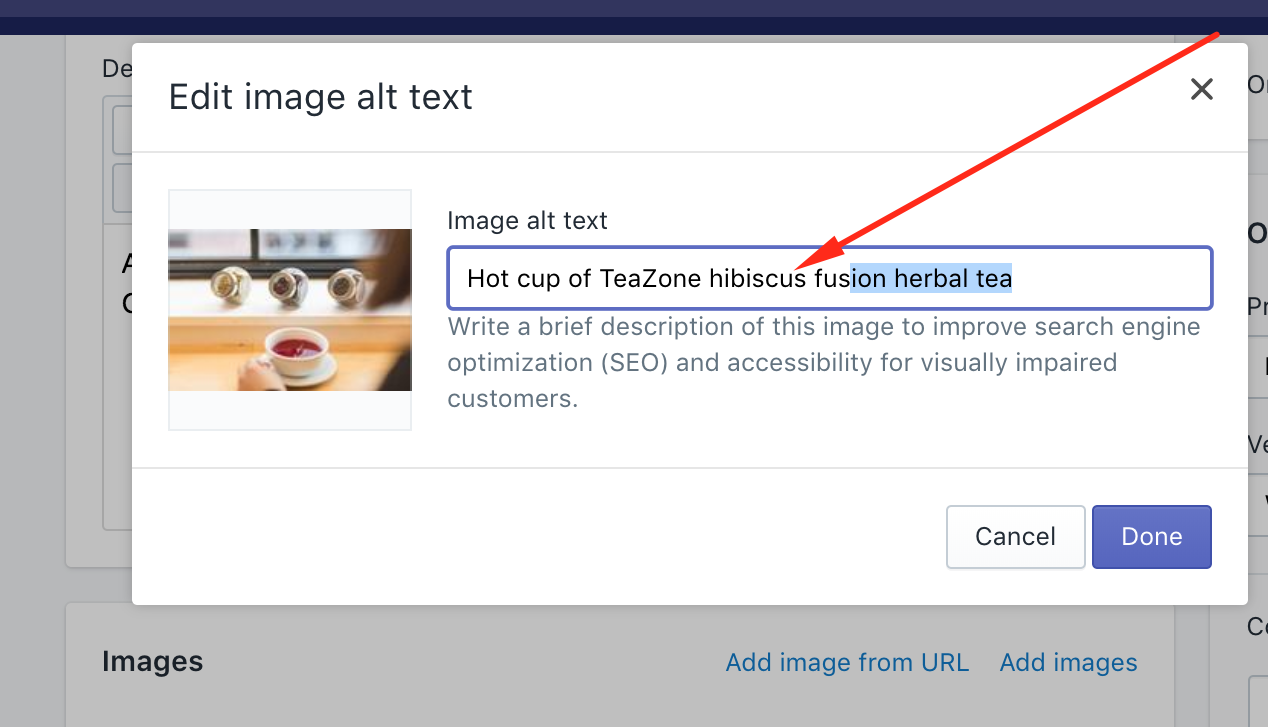
Large image files slow pages down, so compress images before uploading them. Adding alt text also helps search engines understand what each image shows.
(Image Credit: Uplinkly Software)
Update Content
Every once in a while, update the content on your website. Updates can include blog posts, product descriptions and service pages.
Improve Site Structure
One of the easiest ways to make your site look better is to take care of your architecture. Clean up any unnecessary JavaScript files, remove unused CSS classes and focus on improving the structure of your page.
What are Core Web Vitals, and do they affect Domain Authority?
Core Web Vitals are three Google measures of page experience (loading, responsiveness and visual stability), and they do not change Domain Authority, which is based on links.
The three Core Web Vitals
Google’s Core Web Vitals are Largest Contentful Paint (LCP), which should happen within 2.5 seconds; Interaction to Next Paint (INP), which should be under 200 milliseconds; and Cumulative Layout Shift (CLS), which should be under 0.1. You can check all three for free in Google’s PageSpeed Insights.
Domain Authority is a link-based score, so faster pages will not raise Domain Authority directly. Fast, stable pages still give visitors a better experience, which helps them stay and convert.
Make sure your pages load fast and display well on phones, tablets and computers.
How does Domain Authority affect conversions?
Domain Authority does not affect conversions directly, because it measures links, while conversions depend on what visitors do once they reach your site.
Domain Authority is often confused with Ahrefs’ Domain Rating and Google’s PageRank, but each one is a different measure, and Google does not use Domain Authority to rank websites. A higher Domain Authority tends to go along with better rankings, but the score does not cause them.
Tools that report Domain Authority or a similar link score include MozBar, Moz Link Explorer, Ahrefs, SEMrush, Majestic and diib.
The metrics that drive traffic and conversions are different. While page views are directly linked to rankings, conversions are related to product visibility on the sites.
More search visibility can bring more visitors, but conversions depend on clear offers, fast pages and easy next steps once those visitors arrive.
In short, a good Domain Authority score is one that beats your competitors’ scores. Domain Authority reflects your links, not your content or engagement, so pair it with speed, content and conversion checks to get a full picture of your website’s health.
How can diib help you track your Domain Authority?
diib tracks your backlinks, Domain Authority and overall site health in one dashboard and gives you plain-English steps to improve them.
Whether you’re new to SEO or have been doing it for years, diib turns your website data into easy, actionable insights about your traffic, Domain Authority and social media presence. Here are a few of the features you’re sure to appreciate:
- Keyword, backlink, and indexing monitoring and tracking tools
- Blacklist monitoring and objectives for repair
- Core Web Vitals monitoring
- Bounce rate monitoring and recommended fixes
- Facebook and Instagram Insights, plus YouTube video performance
- Broken pages where you have backlinks (404 checker)
- Technical SEO monitoring, including domain authority
Click here for your free 60-second website scan. diib members also get diibLive office hours with diib’s growth experts.