There are various forms of display ads in digital marketing, and one of the most popular is leaderboards advertising. A leaderboards ad is typically a large banner available in either image or text format and covers the content area in a horizontal position. Leaderboard ads are often posted in high-traffic spots to earn more clicks. The main aim of a leaderboard ad is to get people’s attention and generate clicks.
Leaderboard ads come in a few standard sizes, and the most common is 728 pixels wide by 90 pixels tall, which Google AdSense lists among its top performing ad sizes. The 728×90 banner suits marketers who want one ad to span the full width of the content area. An image leaderboard ad carries a single ad, while a text leaderboard can carry several text ads in the same space.
Although text banners might sound more convenient, most leaderboards are images. The image could be animated with an intention to increase click-through rates. A leaderboard ad can be placed either at the top, bottom, or middle of the page. When placed at the top, the marketer will position it right above or before the website header or logo. When positioned at the middle of a page, the ad will have a short article or text either below or above it. It’s rare for marketers to place leaderboards at the bottom due to low visibility.
Why use Leaderboard advertising?
Leaderboard ads help you build brand awareness and reach a larger audience across many websites, apps and devices. To increase ROI (return on investment) on your banner advertising strategy, you should consider customizing your approach with demographic and contextual targeting.
When properly executed, good banner ads could become an important part of your online marketing strategy. Leaderboard ads offer you an opportunity to promote your brand across the internet and reach more potential clients and customers. With this form of display marketing, you will not be restricted to one user-preferred social platform. Your brand can reach consumers or customers across all digital social networks where your audience might be looking for good services, recommendations, goods, and news.
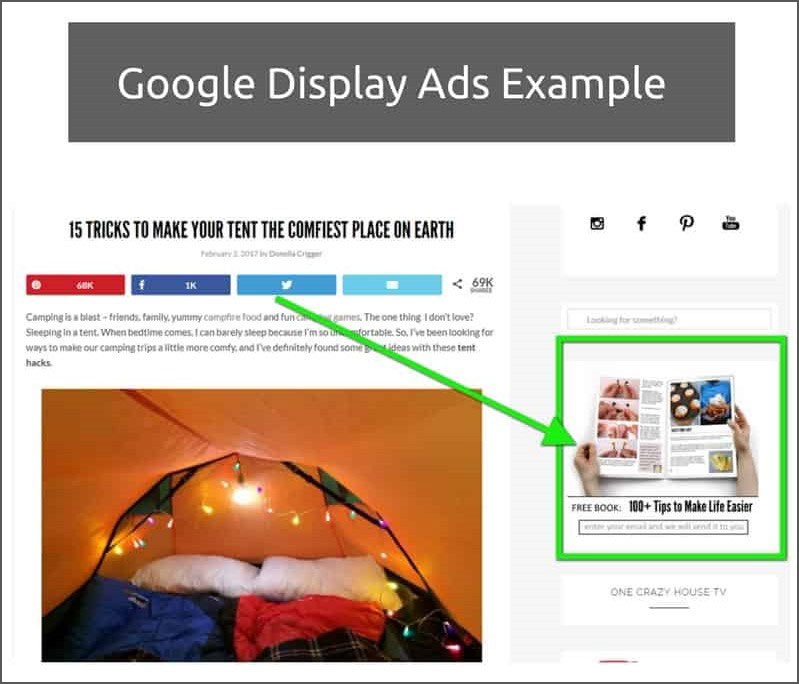
With the Google Display Network, your ads can appear on sites that, according to Google, reach over 90% of internet users worldwide. Display banners let you reach a broad audience at a scale few other channels match. You can also reach your target audience across different devices and throughout the audience’s day, from breakfast to a midnight snack. Here is an example of a Google Display Ad:
(Image Credit: Local Blitz)
With relevant leaderboard ads customized for a specific target audience, you can drive this target group to your website for conversion. There are many ways to achieve personalized targeting but the most commonly practiced one is contextual targeting. The same way you do keyword research and focusing on search engine result page ranking, you can use specific keywords in your online banners. It’s also possible to attract your target audience using demographic targeting by highlighting their geographic location, interests, or language. If you are targeting sports enthusiasts, for instance, you could have the best display banners customized and posted on a popular sports website.
How does display advertising work?
Display advertising works by placing image, video or text ads on websites and apps, where you pay to show them to people who match your targeting.
You can complement your marketing strategy with a well-thought-out leaderboard advertising approach. The display marketing strategy should unify imagery and branding across all online channels. Below are some of the steps you should follow when getting started with your leaderboard advertising campaign:
Design
The first step is assembling text and image elements to create good banner ads or master creatives. The latter act as templates for all banner sizes you will use in your campaign. Some of the basic design principles to abide by include:
- Color that evokes the right emotions and matches your brand identity
- Copy that contrasts with the background and is readable
- A clear logo that stands out
- Relevant and high-quality images
- A call-to-action that drives clicks
Every banner you create should contain these basic elements for it to be engaging and effective. You can create your own banners from scratch, but it’s often a laborious and repetitive process. Developing the best web banner ads calls for expertise in coding and designing skills.
Scaling
Once you have designed your banners, mass production or scaling the ads into various sizes becomes the next step. For a successful display advertising campaign, you will need different sizes of banners for compatibility with various screen sizes and device formats. Scaling is, however, a time-consuming process because each banner must be coded individually and sometimes to work specifically for a particular network.
When done manually, scaling can take days, but luckily enough, there is software designed for automatic optimization of banners. The software relies on creative management platforms such as Bannerflow that employs learning algorithms to automate the banner scaling process. Many people browse on their phones, so you should optimize your banners for mobile formats.
Publishing
This is the final and most important stage of your campaign. By the time your banners get to this stage, they must be well optimized to the sizes offers by chosen ad exchange or ad network. If your using Google, for example, and you have optimized your banners appropriately, you can rest assured that they will display appropriately across all devices.
Publishing each banner individually is another repetitive task you want to avoid. Fortunately, if you had used the Creative Management Platform software to create your ads, you will enjoy direct integration with ad exchanges and ad networks. This means that you can publish and manage your ads by pushing buttons around.
After Publishing
Your campaign will not end after publishing the ads. Actually, publishing marks the beginning of the display marketing strategy for most marketers. It is important to track or monitor the effectiveness of your campaign. This means auditing the campaign costs, assessing the conversion rates, and conducting A/B tests to determine the images and texts that work best for your brand. To improve results, you should create a post-click landing page, as this signifies continuity.
What types of leaderboard ad campaigns are there?
Leaderboard ad campaigns fall into four main types: brand awareness, lead generation, affiliate marketing and retargeting. Below are examples of each.
1. Brand Awareness
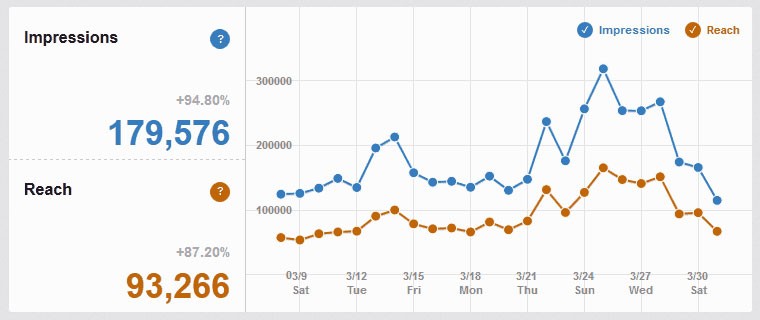
This happens to be the most basic use of leaderboard ads. Brands will often pay to have their best web banner ads displayed across various websites in the same manner that they would have the ads published in a newspaper or on a billboard. The main objective is to get your brand name displayed in front of as many eyes as possible. The success metrics for a brand awareness geared campaign are impressions and reach. For example:
(Image Credit: Shane Barker)
2. Lead Generation
When a campaign is strategized around lead generation, it’s designed to instigate direct interactions with the audience with the intention of leading them to your website and to complete a sale transaction or fill in a form. This type of leaderboard ad will use advanced banners with interactive elements such as in-banner search, product feeds, and live odds. Success metrics for this form of the campaign are click-through-rates and cost-per-click.
3. Affiliate Marketing
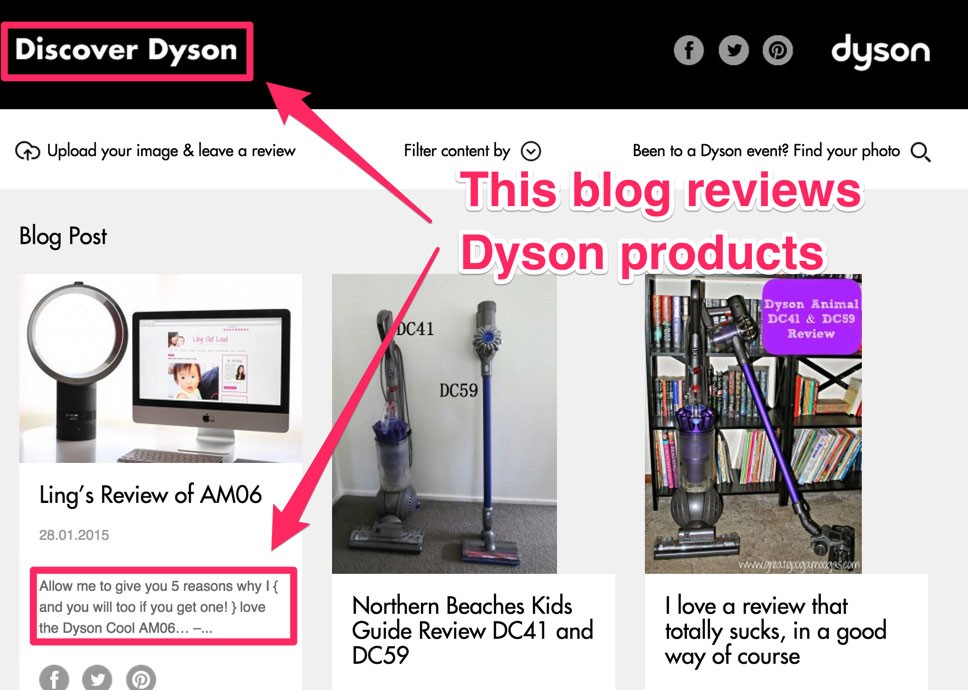
This is typically a business understanding where the publisher, who is a website owner, promotes the advertiser’s or affiliate network’s advertisement in exchange for a commission of every conversion or sale generated by the ad. The advantage of ads designed for affiliate marketing is that they drive click-through-rates in a manner that ordinary ads cannot. Examples are attention-grabbing banner designs, obvious page placements, and uniquely enticing offers. Here is another example of affiliate marketing:
(Image Credit: Neil Patel)
4. Retargeting
This is a digital marketing approach where you present ads to users based on their previous behaviors on your site. The intention is to bring the users back to where they had shown interest, only that this time around, you want to induce them to take action. This technique is effective for converting a viewer into a regular customer or visitor.
There are more banner ads examples out there, such as dynamic creative techniques, user journey retargeting, and dynamic creative optimization.
What makes a leaderboard ad campaign successful?
A successful leaderboard campaign uses engaging rich media, video, mobile-friendly design and live data feeds to keep its ads relevant. Below are four key factors to consider when producing high-performance banner ads:
Animating and Engaging with Rich Media
By incorporating rich media in your display ads, you can easily engage your customers or target audience. Rich media essentially unleashed the full throttle of HTML5, which is the technology most marketers use for display ad marketing.
Rich media can be defined as display ads that incorporate features such as audio, videos, and other creative elements to encourage the audience to interact with your ads. Rich media is a great alternative to videos because it’s way simpler to build HTML5 animations and in smaller sizes. These leaderboard ad example are easily optimizable.
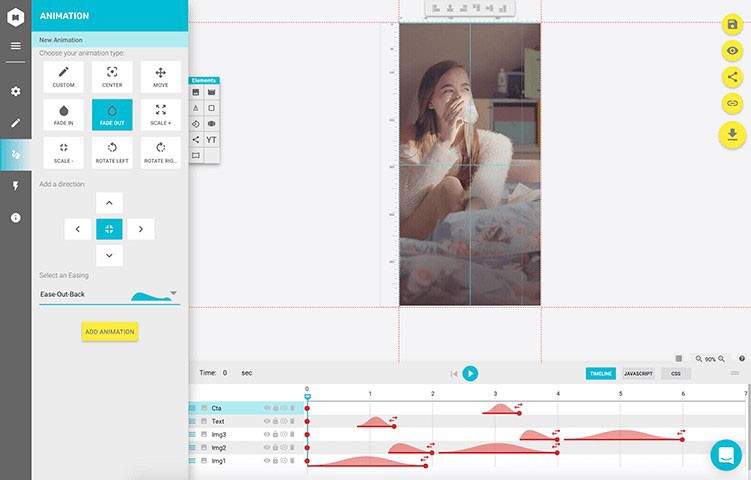
If you want your best banner to stand out, rich media will come in handy as they are designed to grab the viewers’ attention. Rich media ads invite people to interact in ways a static banner can’t. With access to Creative Management Software, you can easily build rich media advertisement banners. The software automatically codes the rich media ad and therefore eliminates the need to hire a professional for the job. For instance:
(Image Credit: AdPushup)
However, rich media ads are weighty, and the size of the file might be too large. When poorly designed, rich media ads might reduce performance by obscuring content or slowing down your webpage’s loading speed. Luckily, it’s possible to optimize the ads to the IAB’s Lean standards.
Using Video to Drive Traffic
You can catch the eye of your viewer by adding a video to your display ads. In-banner videos are known to create continuity from ad campaigns of social media. Are you wondering what an in-banner video is? Well, this is a video incorporated within a banner ad. the video can be inserted in a manner that prompts the viewer to click for the full version or as part of the HTML5 animation.
Viewers often prefer in-banner video ads to static banners, and video is a strong tool for encouraging engagement.
You can also use in-banner video ads to improve your website’s user experience. If a visitor does not want to interact with the video, they will pass it, and when they actually want to, they will go ahead and engage with it. Visitors are presented with a positive choice.
There are numerous ways of incorporating videos in your campaign. You could use them as background for your product ads. You can export your banners as MP4 files for use within Digital Out-of-Home or display ad marketing. The image below shows an example of a video ad. This banner allows the reader to click on a link to watch the full video.
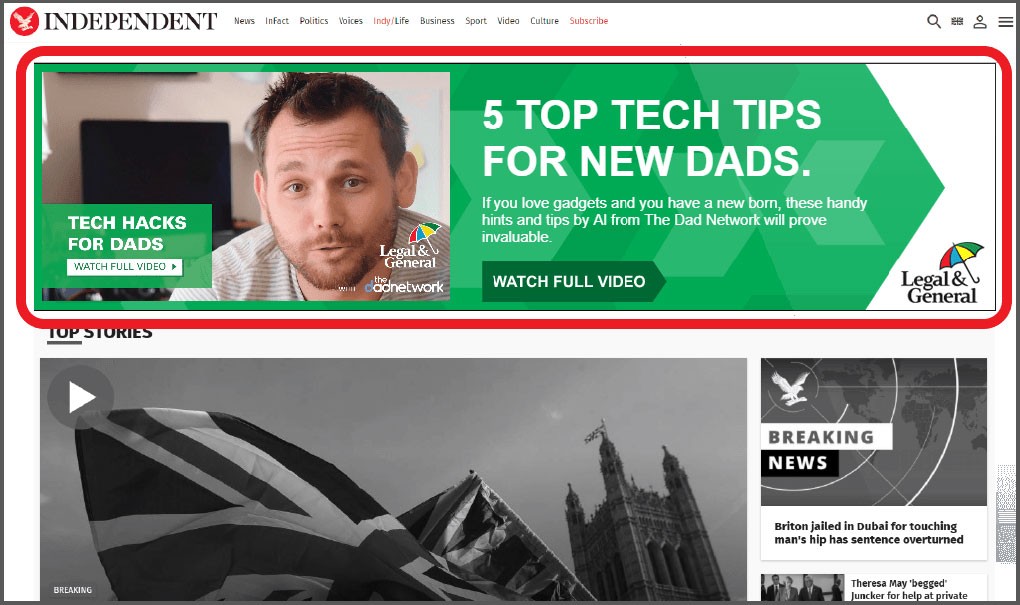
(Image Credit: Merkle)
Optimizing Campaigns for Mobile Friendliness
Optimizing leaderboard ads for mobile devices should be a priority for any marketer. The best display ad campaign is one that works effectively across all devices and can adapt to the changing consumer habits such as high mobile ad spends over weekends.
All your ads should be well optimized by scaling and coding them for compatibility with mobile devices. The size of the banner can be made responsive and still feature elements such as images, videos, creative elements, and audios tailored for effective interaction with mobile users.
The use of mobile devices has been on the rise over the years. Therefore, the best banner is one that is responsive to these devices and is scaled to the appropriate mobile size. If you really want to achieve optimum results, you should adapt to how your audience consumes information. Mobile searches are as effective as desktop searches, and advanced features should be applied in mobile ads to avoid rendering them static and lifeless.
Mobile gadgets are more preferred for leisure hours. To tap into this trend, consider producing high-performance leaderboard ads. You should then pay close attention to the banner sizes you publish, when, and where. With a Creative Management Platform software, creating, optimizing, and publishing mobile-friendly ads should not be a problem.
When optimizing display ads for mobile, marketers are encouraged to use the same technology, tactics, and strategies they would apply for desktop ads. Successful leaderboard ad campaigns are those that are responsive across all devices, and mobile users should have the same exquisite experience as desktop users. Google retired its Mobile-Friendly Test in December 2023, so check your ads and pages with the Lighthouse tool built into Chrome or on real phones. The screenshot below shows the old tool:
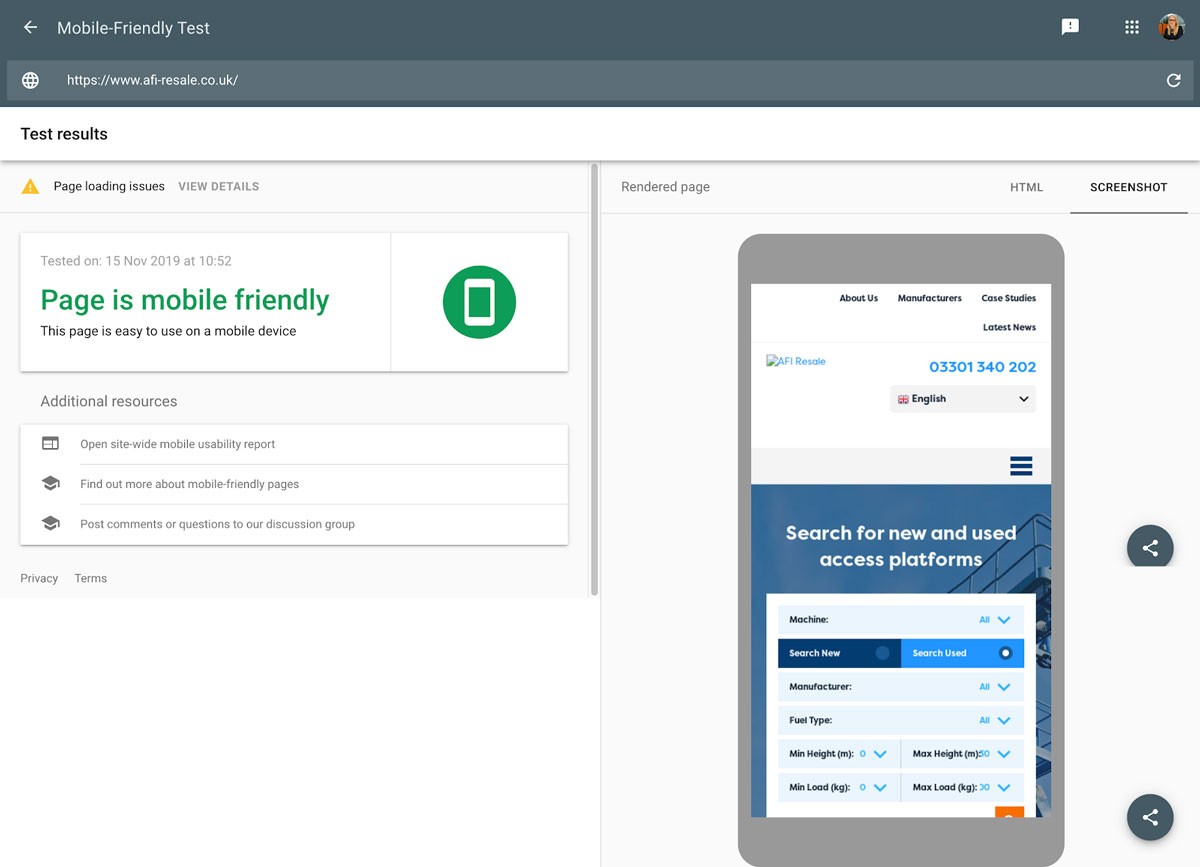
(Image Credit: Google Support)
Linking Live Data Feeds to your Banner Ads
You can make the most basic ads more relevant by simply adding data feeds to them. When you incorporate these live feeds, you get to offer your audience more information about your brand in real-time. It could be your brand’s latest achievements, products, sports odds, or offers.
A web feed or data feed is typically a spreadsheet that updates information on an ad in real-time. The feeds could be XML files containing data such as numeric values, sentences, or words, in any language, links, or image URLs. A data feed is a great tool for a dynamic display of live inventory.
With a web feed, you are assured that your ad campaign will remain relevant, fresh, and personal. This is a dazzling way to display and control the consumption of relevant brand information.
Data feeds were first used in the iGaming industry to display live sport betting odds. Brands in other industries have since adopted data feeds to pass brand information and awareness to clients. This strategy has gained popularity due to the ease of creation and control with Creative Management Platform technology. All you need to do is connect the feed to your master design, and the copy will show your offers, products, or services across all ads in your campaign.
You can use data feeds in smart campaigns that apply dynamic creative strategies to display more data. If you are thinking of building a hyper-relative and personalized ad, data feed is the way to go.
A combination of retargeting and data feed is a brilliant way to enhance leaderboard advertising performance. You can customize the data feed in a manner that each customer only sees data that is relevant to what he or she is interested in.
diib: Advertising Stats Every Business Needs!
Your leaderboard ads should not be static, simple, and boring. With the appropriate technology and expertise, you can create relevant and engaging banners with much ease. Using diib will bring you an added measure of confidence that your ad campaign is reaching the right audience and is effective. Here are a few of the features of our User Dashboard we’re sure you’ll love:
- Keyword, backlink, and indexing monitoring and tracking tools
- User experience and mobile speed optimization
- Bounce rate monitoring and repair
- PPC monitoring, including ETAs and conversion rates
- Social media integration and performance
- Broken pages where you have backlinks (404 checker)
- Technical SEO monitoring
Click here for your free scan or simply call 800-303-3510 to speak to one of our growth experts.
Frequently asked questions
What size is a leaderboard ad?
The standard leaderboard is 728 pixels wide by 90 pixels tall. A larger version, sometimes called a super leaderboard, is 970 by 90 pixels, and the common mobile leaderboard is 320 by 50 pixels. Check each ad network's specifications before designing, since accepted sizes and file limits vary.
Where are leaderboard ads usually placed?
Leaderboards usually sit at the top of a page, above or just below the site header, where visitors see them as soon as the page loads. They also appear between sections of content or above the footer. Top placements generally get the most visibility, while bottom placements are rarely seen.
Do leaderboard ads work on mobile?
A full 728 by 90 banner is too wide for most phones, so mobile pages typically use a 320 by 50 mobile leaderboard or a responsive ad unit instead. Keep the message short, use a clear call to action and make sure the ad does not cover content, which frustrates visitors.
What makes a leaderboard ad effective?
Effective leaderboards have one clear message, a visible call to action and branding that is recognizable at a glance. Because the space is short and wide, keep text brief and readable. Test a few versions, track click-through and conversion rates, and send clicks to a landing page that matches the ad's promise.